
YouTube is a part of your Google Account
You sign in to YouTube with a Google Account, the same login as Gmail, Drive and Photos. The obvious “delete my account” route deletes everything, and the YouTube-only routes are spread over three places. YouTube’s terms describe the full route as deleting the Service “from your Google Account, which involves closing your YouTube channel and removing your data, with the option to download a copy of your data first.”
Pick what you actually want gone:
| You want to remove | Where it is done | Google Account stays? |
|---|---|---|
| Videos, playlists, channel and what is attached to it | YouTube Studio, Remove YouTube Content (computer only) | Yes |
| What you watched and searched | My Activity, YouTube History | Yes |
| Comments you wrote | Comment History | Yes |
| Everything Google holds, including Gmail | Delete your Google Account | No |
For the last row, and for how Google answers privacy requests in general, read the Google guide. This guide covers the YouTube side.
Hide the channel first if you are unsure
Deleting is permanent. YouTube Help also offers a reversible option: you can “temporarily hide your YouTube channel and restore it at any time”, and hiding “will not delete your channel”. While hidden, your channel, videos, playlists and community posts disappear from search and other users. When you restore it, previously public videos come back as private.
Hiding is not erasure, because YouTube Help describes your content as hidden, not removed. Use it to see how it feels before you delete.
Delete the channel
- Sign in to YouTube Studio.
Use a computer. YouTube Help says “you can’t currently delete a channel on mobile devices”.
- Open the advanced settings.
From the left sidebar select Settings, then Channel, then Advanced Settings.
- Choose Remove YouTube Content.
It is at the bottom. If you are asked, enter your sign-in details.
- Select I want to permanently delete my content.
Tick the boxes to confirm, then select Delete my content.
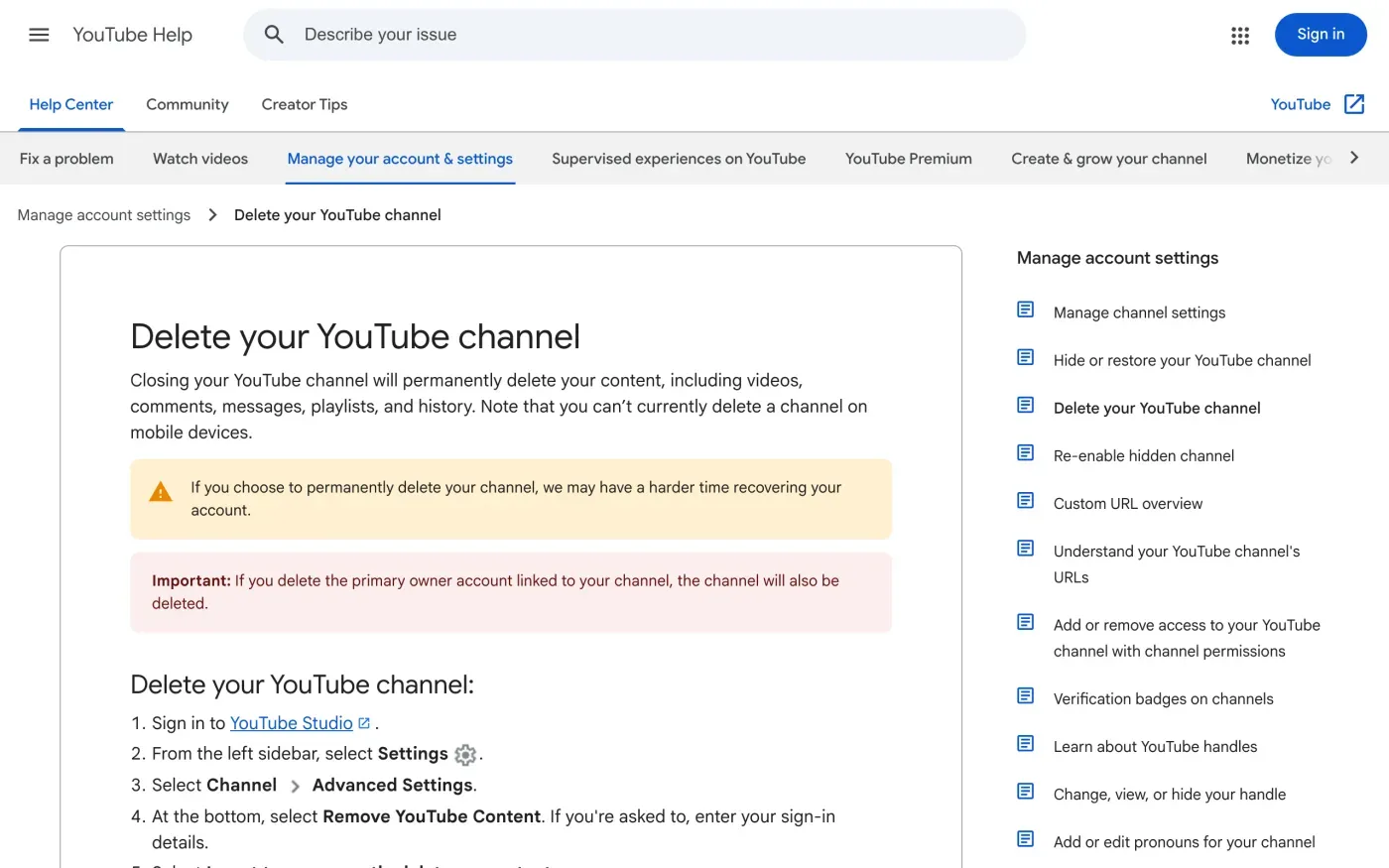
What YouTube says you lose: “videos, comments, messages, playlists, and history.” It adds that “it may take some time for your channel to be permanently deleted” and that you may “continue to view thumbnails of your videos on the site” in the short term. YouTube Analytics keeps aggregate data such as watch time, “but will not be attributed to the deleted channel”.
Download your videos and data first
There is no undo, and recovery is described as harder after a permanent delete. Take a copy first. This is your right of access (Article 15 of the GDPR).
- To get the videos you uploaded, YouTube Help says you can “use Google Takeout to download all the videos you’ve uploaded”. You can also download single videos from Studio, up to five times a day each.
- To get the rest of your YouTube data, use Google Takeout at takeout.google.com and select YouTube. Google’s help page says downloading “doesn’t delete it from Google’s servers”.
You cannot download other people’s videos. YouTube Help says so directly.
Delete your watch and search history
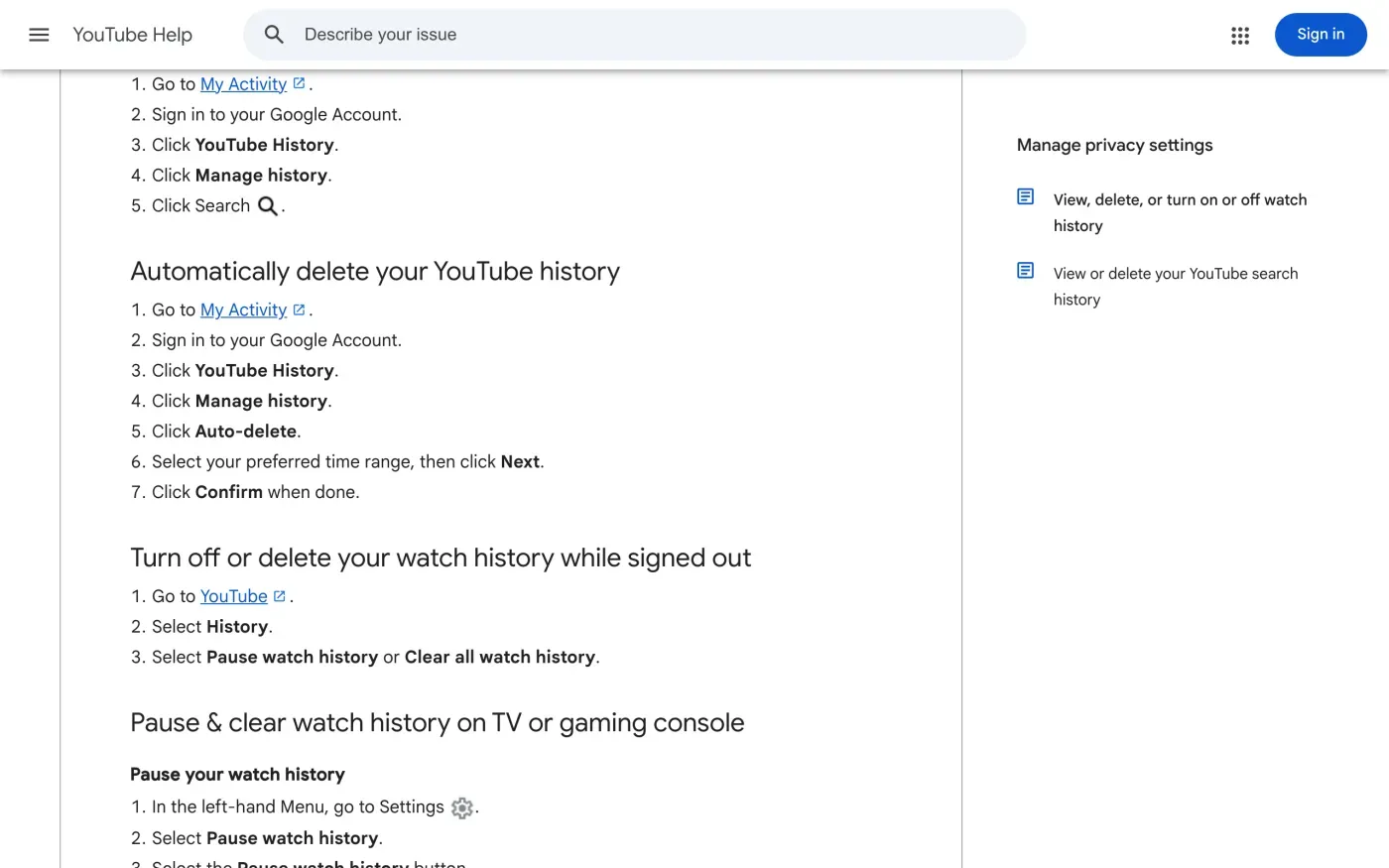
You do not need a channel for this. YouTube Help sends you to My Activity: sign in, click YouTube History, then Manage history. You can delete single items, delete a time range, or set Auto-delete and pick a time range, then confirm. You can also turn watch history off. If you are signed out, YouTube Help says to open YouTube, select History, then Pause watch history or Clear all watch history.
Delete your comments
YouTube comments are public. YouTube Help says you can “view public comments you’ve left across YouTube” in Comment History, and to delete one you go to Comment History and select the delete icon on the comment you want to remove. You can also edit or delete a comment from the video page with More, then Delete.
Two limits from the same page: a comment on a deleted video does not show in your history, and a comment YouTube removed for a policy violation does not either. Deleting your channel deletes your comments with it, which is the quick route if you want them all gone.
Who holds your YouTube data
YouTube’s terms name the company, and it is not the same in every country.
| If you live in | Provider named by YouTube | Address given |
|---|---|---|
| The European Economic Area or Switzerland | Google Ireland Limited | Gordon House, Barrow Street, Dublin 4, Ireland |
| The United Kingdom | Google LLC | 1600 Amphitheatre Parkway, Mountain View, CA 94043, USA |
Google’s privacy policy, under Data controller, names the same two companies by region. These are the companies’ addresses as published, not an address for sending requests.
When the settings are not enough
If you cannot sign in, want a written list of what is kept, or want data erased that the tools above do not reach, make a GDPR request. Google publishes no email address for this. Its privacy policy, under How to exercise your rights and contact Google, links to its Privacy Help Center, and two web forms sit behind it:
| Form | What it is for |
|---|---|
| Privacy Inquiry form | Privacy questions and requests. Choose YouTube as the product and your country. |
| Data Privacy Office Inquiry | Goes to Google's Data Privacy Office. |
Do not send the request to an address from a forum post. The Google guide describes what each form asks.
What YouTube keeps
YouTube’s terms say that when you remove content, YouTube does not have to “delete copies we reasonably need to keep for legal purposes”. Google’s privacy policy says some data is kept longer for “legitimate business or legal purposes”. It gives no per-product list of periods, so ask in your request what was kept and why. The GDPR lets a company keep data it must keep by law (Article 17(3)(b)), but it should tell you.
The letter
Paste a short version into the privacy inquiry form, which limits the text. Use the first letter in the EU, and the second, which cites the UK GDPR, in the UK. Fill in your Google Account email and your channel name or handle if you have one.
Dear YouTube privacy team,
Under Article 17 of the GDPR, I ask you to erase all the personal data you hold about me.
My account uses the email address [your account email]. If you keep any of my data, please tell me what you keep and the legal reason.
Please answer within one month of receiving this request, as Article 12(3) of the GDPR requires.
Kind regards,
[Your name]
Dear YouTube privacy team,
Under Article 17 of the UK GDPR, I ask you to erase all the personal data you hold about me.
My account uses the email address [your account email]. If you keep any of my data, please tell me what you keep and the legal reason.
Please answer within one month of receiving this request, as Articles 12(3) and 12A of the UK GDPR require.
Kind regards,
[Your name]
To ask for a written copy of what YouTube holds first, use the subject access request guide. For the rules and deadlines, see the deletion letter guide, the UK right to be forgotten guide and the response deadline guide.
More accounts than YouTube?
Reflex finds the companies in your Gmail, sends this letter to each from your own address and follows up for three months. Free to join the beta, €19 once when you start.
If YouTube does not answer
The provider has one month from receiving your request, extendable by two months only if it tells you why within the first month (Article 12(3)). If that passes, send a reminder through the same form. The guide to ignored requests has one.
If there is still no answer, complain to a data protection authority (Article 77). For the EU company, Google Ireland Limited is in Dublin, so the Irish Data Protection Commission is the lead regulator. It has an online complaint form and says to raise the matter with the organisation first. You can also complain to the authority where you live. In the UK, the provider is Google LLC, and you complain to the ICO.
For the rest of your Google Account, see the Google guide. To find other companies that hold your data, see how to find which companies have your data.
Questions
Does deleting my YouTube channel delete my Google Account?
No. YouTube Help says the channel steps "will only delete your YouTube channel, not your Google Account you use to sign in with."
Can I delete my YouTube channel on my phone?
YouTube Help says you can't currently delete a channel on mobile devices. Use a computer.
What is the difference between hiding and deleting a channel?
Hiding is temporary and reversible. Your channel, videos and playlists disappear from other users and you can restore them. Deleting permanently removes your content.
How do I delete all my YouTube comments?
Open Comment History from YouTube Help and delete each comment from there. Comments on a deleted video do not show in that history.
Does YouTube have its own email address for privacy requests?
Its help and terms pages give none for GDPR requests. It points to Google's privacy forms, so use those and do not trust an address you found elsewhere.
Who is YouTube in the EU and the UK?
YouTube's terms name Google Ireland Limited as the provider for the European Economic Area and Switzerland, and Google LLC for the United Kingdom.
Sources
- Delete your YouTube channelYouTube Help, checked 16 November 2026
- Hide or restore your YouTube channelYouTube Help, checked 16 November 2026
- View, delete, or turn on or off watch historyYouTube Help, checked 16 November 2026
- Post & interact with comments, View your comment history, Edit and delete commentsYouTube Help, checked 16 November 2026
- Download YouTube videos that you've uploadedYouTube Help, checked 16 November 2026
- YouTube Terms of Service (UK version), Your Service Provider, Terminations by You, dated 17 March 2025YouTube, checked 16 November 2026
- Google Privacy Policy, Effective 16 October 2026, European requirements (How to exercise your rights and contact Google, Data controller)Google, checked 16 November 2026
- How to download your Google dataGoogle Account Help, checked 16 November 2026
- Privacy Inquiry formGoogle Policies Help, checked 16 November 2026
- Data Privacy Office InquiryGoogle Policies Help, checked 16 November 2026
- Raising a concern with the Data Protection CommissionData Protection Commission (Ireland), checked 16 November 2026
- Regulation (EU) 2016/679, the GDPR, Articles 12(3), 15, 17 and 77EUR-Lex, checked 16 November 2026
- Make a complaintICO, checked 16 November 2026