
One account, many products
A Google Account is the login for Gmail, Drive, Photos, YouTube, Maps, Google Play and more, so deleting it affects everything you reach with that one sign-in.
Google’s help page says it plainly: you lose “all the data and content” in the account, such as emails, files, calendars and photos, and “access to subscriptions and content you bought with that account on YouTube or Google Play, like apps, movies, games, music, and TV shows.” Check these before you start:
| If you use the account for | What Google says or what follows |
|---|---|
| Gmail | Your Gmail address stops working. Google says you can remove only the Gmail service from the account if you need a different address, without deleting everything else. |
| Google Play and YouTube purchases | You lose access to apps, games, films, music and subscriptions bought with that account. |
| Photos, Drive, Calendar | Deleted with the account. Download them first. |
| Logins on other sites ("Sign in with Google") | Not covered by Google's page. Change the login on each site before you delete, or you may lose those accounts too. |
If you only want to stop one product, or erase one kind of data such as activity history, you do not need to delete the account. The privacy controls in your account do that. This guide is for when you want the whole account and its data gone.
Download your data first
Google’s help page says that if you change your mind, “you might not be able to recover it after a certain amount of time”, and its recovery page gives no exact period, so do not count on a window. If you want a copy, take it before you delete. This is your right to a copy of your data (Article 15) and to take it elsewhere (Article 20).
The tool is Google Takeout, at takeout.google.com. Google’s help page describes three steps:
- Choose what to include.
Sign in, open the Google Takeout page, pick the products to include or exclude, then Next step.
- Choose how to receive it.
Pick the delivery method (an email link, Google Drive, Dropbox, OneDrive or Box), one-time or scheduled export, the file type (zip or tgz) and the archive size.
- Download the link.
Google emails a link when the archive is ready. It says this takes “from a few minutes to a few days”, the link “expires in about 7 days”, and each archive can be downloaded 5 times.
Delete the account yourself
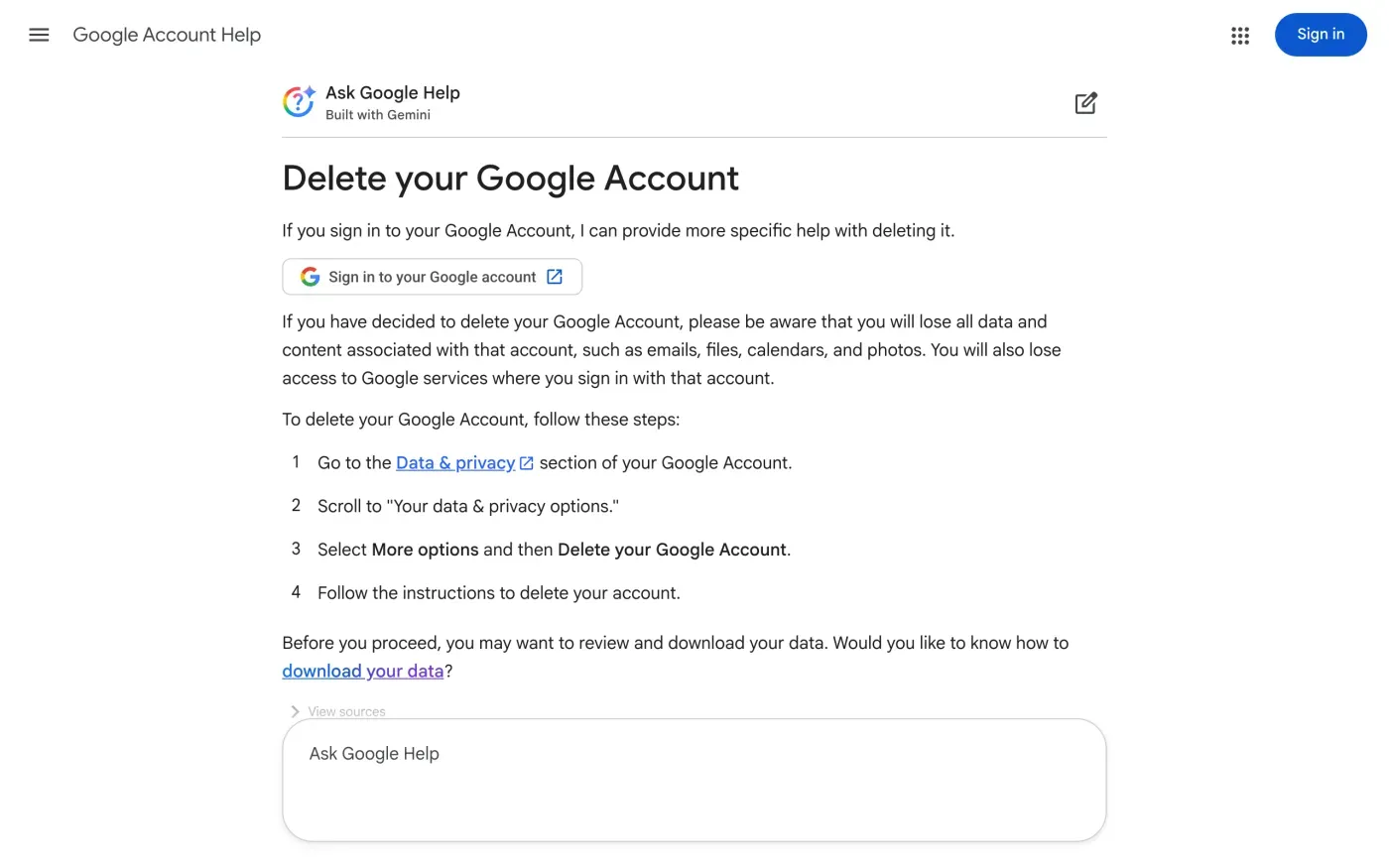
This is Google’s own route and it needs you to be signed in. The help page says to go to the Data & privacy section of your Google Account, scroll to “Your data & privacy options”, select More options, then Delete your Google Account, and follow the instructions. Google’s direct link, from its privacy policy, is myaccount.google.com/deleteaccount.
When you cannot sign in, or want a written answer
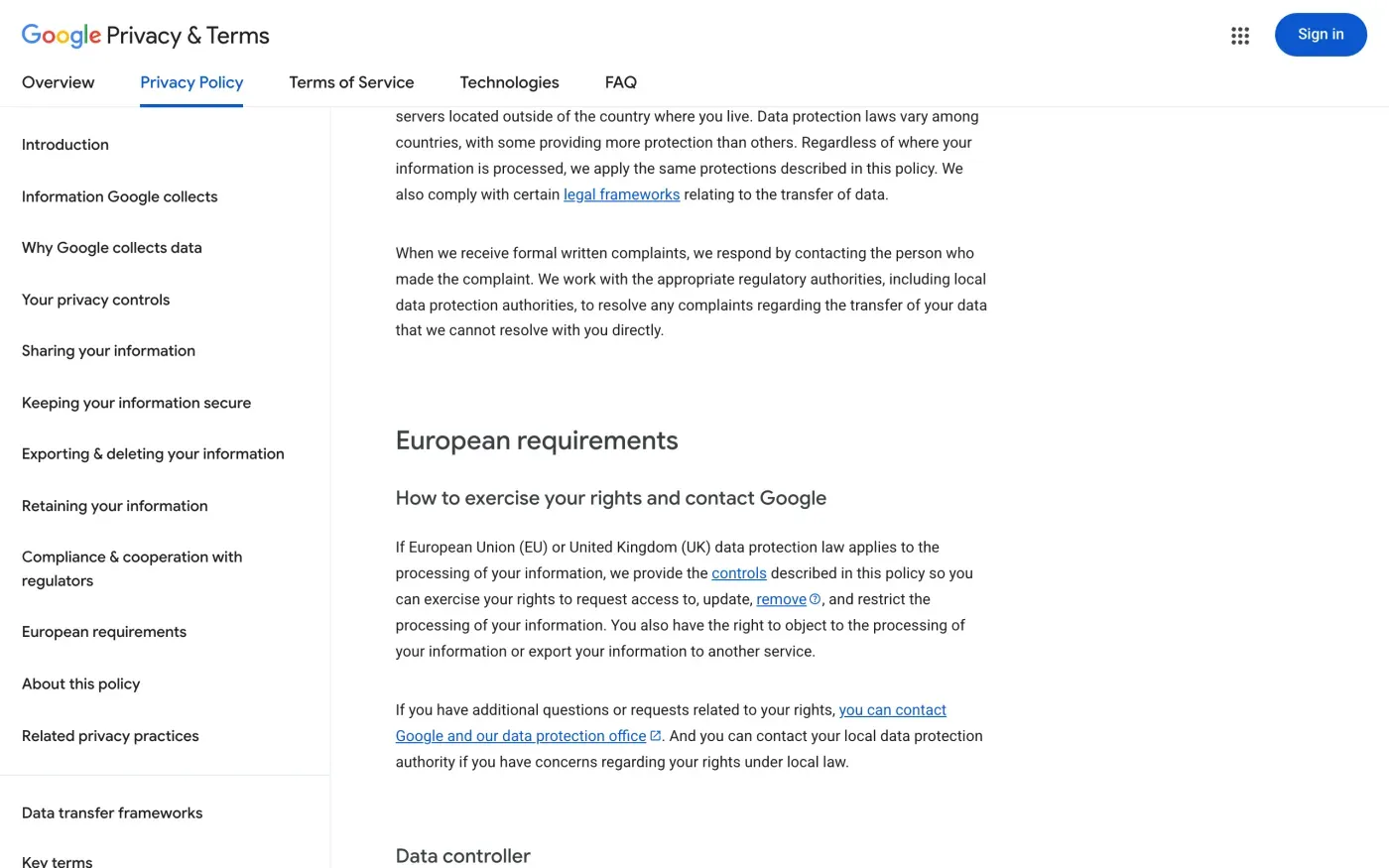
There is no email address for privacy requests in Google’s privacy policy. Under “How to exercise your rights and contact Google”, it says:
If you have additional questions or requests related to your rights, you can contact Google and our data protection office. And you can contact your local data protection authority if you have concerns regarding your rights under local law.
That link leads to Google’s Privacy Help Center. Two web forms sit behind it, and Google publishes no email address or postal address for requests:
| Form | What it says |
|---|---|
| Privacy Inquiry form | For privacy questions, complaints and inquiries. Asks your country, the Google product and a request type such as "Access my data" or "Delete my Google Account", plus a description of up to 750 characters. |
| Data Privacy Office Inquiry | Goes to "Google's Data Privacy Office, led by our Data Protection Officer". Asks for name, email, country, product and a description. Google asks you to allow up to 10 business days for review. |
Use these forms rather than an address you found elsewhere. Google also has a data access request form at support.google.com/policies/contact/sar. When we opened it without signing in, Google sent us to a login page, so expect to need your account for it. If you are locked out of the account, use the privacy inquiry form with an email address you can answer from, and say that you cannot sign in.
Who holds your data: Google Ireland or Google LLC
Google’s privacy policy, under Data controller, names two companies:
| If you live in | Controller named in the policy | Address in the policy |
|---|---|---|
| The European Economic Area or Switzerland | Google Ireland Limited | Gordon House, Barrow Street, Dublin 4, Ireland |
| The United Kingdom | Google LLC | 1600 Amphitheatre Parkway, Mountain View, California 94043, USA |
The policy also says Google Ireland Limited is the controller for processing information to train Google’s AI models for use in services it provides in the EEA or Switzerland. Google gives these as the controllers’ addresses, not as places to post a request. Send the request through the form and name the controller that applies to you.
What Google keeps after you delete
Google’s privacy policy has a section called Retaining your information. In its words, some data you can delete at any time, some is deleted automatically after a set period (such as advertising data in server logs), and some is kept until you delete your account. It also says it keeps some data longer for “legitimate business or legal purposes, such as security, fraud and abuse prevention, or financial record-keeping.”
Google does not give one list of periods for each product on that page. The GDPR lets a company keep data it must keep by law (Article 17(3)(b)), but it has to tell you what it kept and why. Your message should ask for that.
The letter
The privacy inquiry form limits your description to 750 characters, so the full letter below suits places that take more text, such as a reply to Google or a complaint to the regulator. In the form itself, write something short, for example:
I ask Google Ireland Limited, controller of my Google Account, to erase all personal data it holds about me under Article 17 of the GDPR. Please delete the account and the data linked to it across every Google service I used, and tell me in writing what you keep and the legal reason. Please answer within one month (Article 12(3)).
If you live in the UK, change the first line to Google LLC and the law to the UK GDPR.
Fill in your account email and name. Use the first letter in the EU and the second, which cites the UK GDPR, in the UK.
Dear Google privacy team,
Under Article 17 of the GDPR, I ask you to erase all the personal data you hold about me.
My account uses the email address [your account email]. If you keep any of my data, please tell me what you keep and the legal reason.
Please answer within one month of receiving this request, as Article 12(3) of the GDPR requires.
Kind regards,
[Your name]
Dear Google privacy team,
Under Article 17 of the UK GDPR, I ask you to erase all the personal data you hold about me.
My account uses the email address [your account email]. If you keep any of my data, please tell me what you keep and the legal reason.
Please answer within one month of receiving this request, as Articles 12(3) and 12A of the UK GDPR require.
Kind regards,
[Your name]
If you want a written answer listing what Google holds about you, rather than a Takeout archive, the subject access request guide has the request. For the deadlines, see the deletion letter guide, the UK right to be forgotten guide and the response deadline guide.
More accounts than Google?
Reflex finds the companies in your Gmail, sends this letter to each from your own address and follows up for three months. Free to join the beta, €19 once when you start.
If Google does not answer
Google has one month from receiving your request, extendable by two months only if it tells you why within the first month (Article 12(3)). If that passes, send a reminder through the same form and keep your case reference. The guide to ignored requests has a reminder letter.
If there is still no answer, complain to a data protection authority (Article 77). Google’s privacy policy only says you can contact your local authority, and it does not name a lead one. Google Ireland Limited is in Dublin, so the Irish Data Protection Commission is the regulator for the EU company. The DPC has an online complaint form and says you should first raise the matter with the organisation. It gives its address as Data Protection Commission, 6 Pembroke Row, Dublin 2, D02 X963, Ireland. You can also complain to the authority where you live, which forwards a cross-border complaint.
In the UK, the controller is Google LLC, and you can complain to the ICO.
To find other companies that hold your data, see how to find which companies have your data. For shops, see the guides to Zalando and Vinted.
Questions
What is Google's email address for deleting my data?
Google's privacy policy does not give one. It links to a data protection office contact page and a privacy inquiry form instead, and the form offers "Delete my Google Account" as a request type.
How do I delete my Google account?
Google's help page says to go to the Data & privacy section of your Google Account, scroll to "Your data & privacy options", select More options, then Delete your Google Account, and follow the instructions.
What do I lose if I delete my Google account?
Google says you lose all the data and content in the account, like emails, files, calendars and photos, plus access to subscriptions and content bought with that account on YouTube or Google Play.
Can I get a copy of my data before deleting?
Yes. Google Takeout exports a copy of your Google Account content. Google says archives are emailed as a link that expires in about 7 days, and that downloading does not delete anything from Google's servers.
Who is responsible for my data, Google Ireland or Google LLC?
Google's privacy policy names Google Ireland Limited for users in the European Economic Area or Switzerland, and Google LLC for users in the United Kingdom.
Sources
- Google Privacy Policy, Effective 16 October 2026, European requirements (How to exercise your rights and contact Google, Data controller)Google, checked 15 November 2026
- Delete your Google AccountGoogle Account Help, checked 15 November 2026
- How to download your Google dataGoogle Account Help, checked 15 November 2026
- Recover a deleted Google AccountGoogle Account Help, checked 15 November 2026
- Privacy Help CenterGoogle Policies Help, checked 15 November 2026
- Privacy Inquiry formGoogle Policies Help, checked 15 November 2026
- Data Privacy Office InquiryGoogle Policies Help, checked 15 November 2026
- Raising a concern with the Data Protection CommissionData Protection Commission (Ireland), checked 15 November 2026
- Regulation (EU) 2016/679, the GDPR, Articles 12(3), 17, 20 and 77EUR-Lex, checked 15 November 2026
- Make a complaintICO, checked 15 November 2026