
Two different jobs
Huawei offers two routes, and only one of them gives you a written answer.
| Route | What it does | What you get |
|---|---|---|
| Delete account, in your phone settings | Deletes your HUAWEI ID and the services tied to it | No written answer, and nothing about what Huawei keeps |
| A rights request through Huawei's portal | Asks Huawei to erase or send you your personal data under the GDPR | A reply that has to arrive within one month, with reasons for anything it keeps |
If you want a copy of your data, ask for it before you delete the account. The request needs your HUAWEI ID, and it goes with the account.
Delete the HUAWEI ID
Huawei’s help centre gives this route on the phone or tablet where you are logged in:
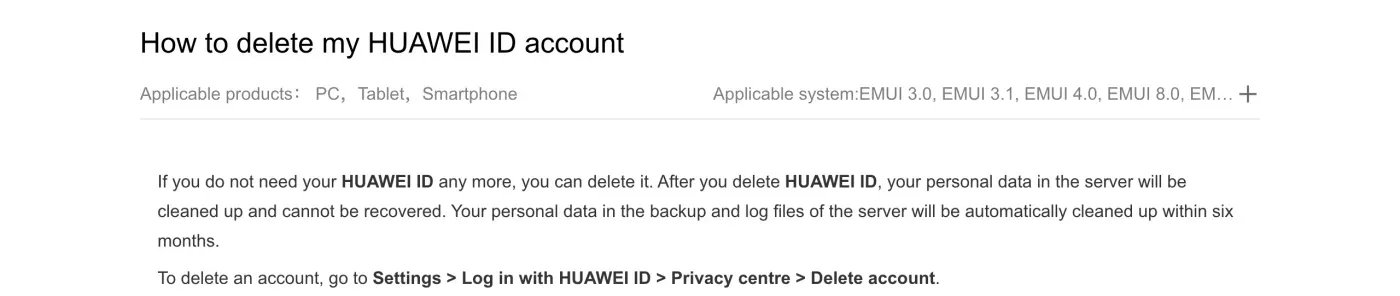
- Open Settings and tap your HUAWEI ID.
The entry reads Log in with HUAWEI ID if you are not signed in.
- Go to Privacy centre, then Delete account.
If Delete account is not shown, the help article says to update Huawei Mobile Services from Google Play.
- Delete any child account first.
The article says to log in with the child account and delete it, then delete the main account.
- Confirm with your password.
The English help article says the password is required and that the phone number or email on the account must be able to receive the verification code.
There is a web route too. The UK help article links a Huawei login page where you open the settings in the top right and scroll to Delete account.
If you signed up with a Google or Twitter account and cannot find Delete account, Huawei’s help article says to link a phone number that is not registered with another HUAWEI ID, then try again. It also says a phone number cannot be unlinked from a HUAWEI ID, only changed.
If you cannot log in
The deletion steps need your password and a code sent to the number or email on the account. Huawei’s help article points to its “I forgot my HUAWEI ID password” article for that. If the self-service recovery does not work, the Privacy Questions page says to call the service hotline or use its form. For erasure itself, you do not need to be logged in: the portal has a route for people without a HUAWEI ID.
Where a GDPR request goes
Huawei’s privacy statement, updated July 2026, limits where a request can go. Section 5.1 says:
Data subjects’ requests must be submitted in writing. The requests are equally valid even if the requester does not specify the laws on which the requests are based.
Data subjects’ requests can be submitted through the official website of Huawei Consumer BG, My HUAWEI app, or HUAWEI ID Privacy center. If a data subject initiates a request via a hotline, email, online customer service, service center, or other channels, we will instruct the data subject to raise an official request through one of the aforementioned channels
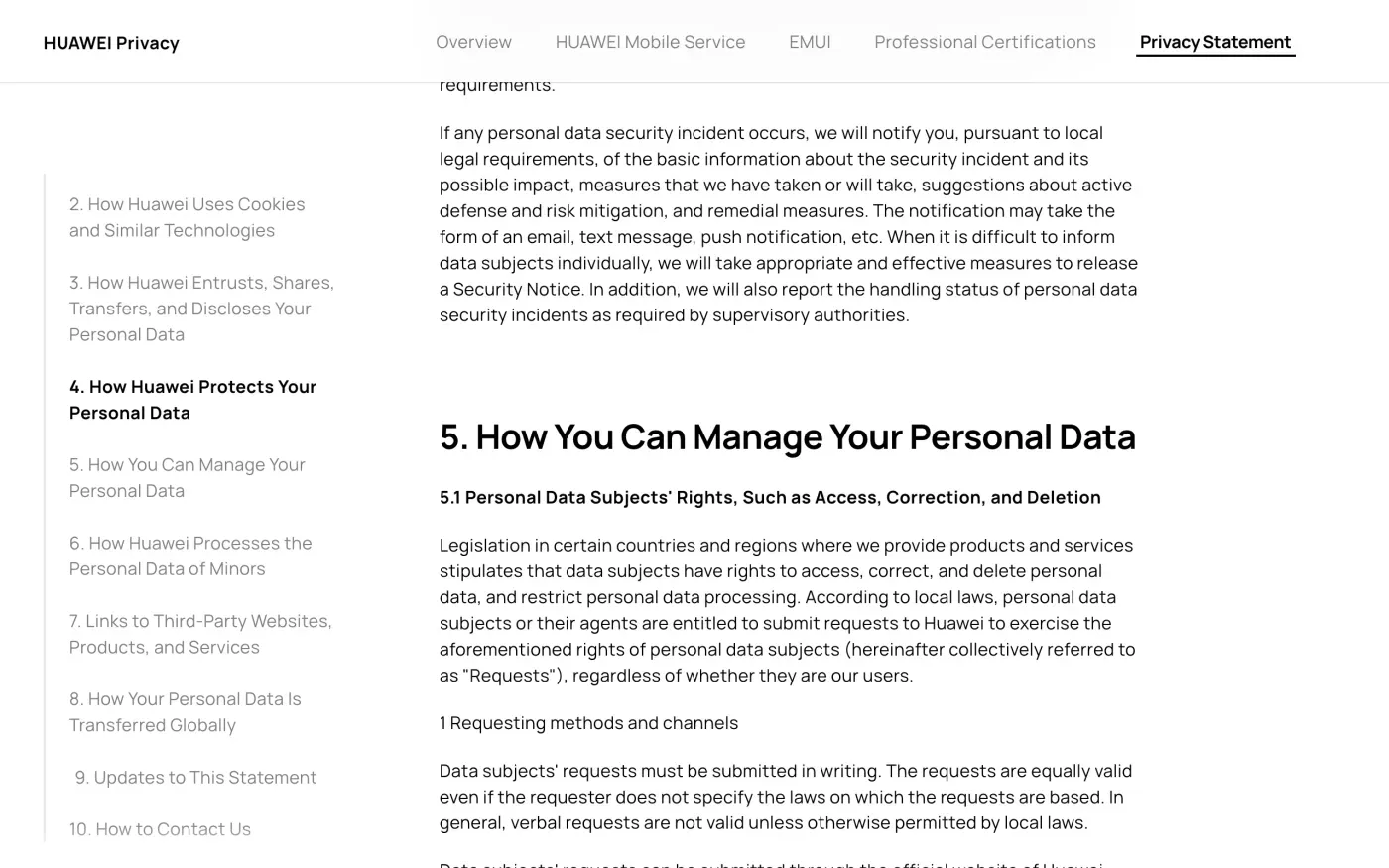
The privacy statement’s contact section lists no email address. It points to the online customer service, the Privacy Questions page, or Huawei’s global offices.
The Privacy Questions portal
The official website route is the Privacy Questions portal. You pick your region and country, then what the enquiry is about: Huawei Mobile Services (HUAWEI ID, Health, Cloud, AppGallery, Themes, Video, Music, Wallet), E-Commerce, local sales and repair, or a Device. The issue types include “Execution of data subject rights” and “Contact DPO”.
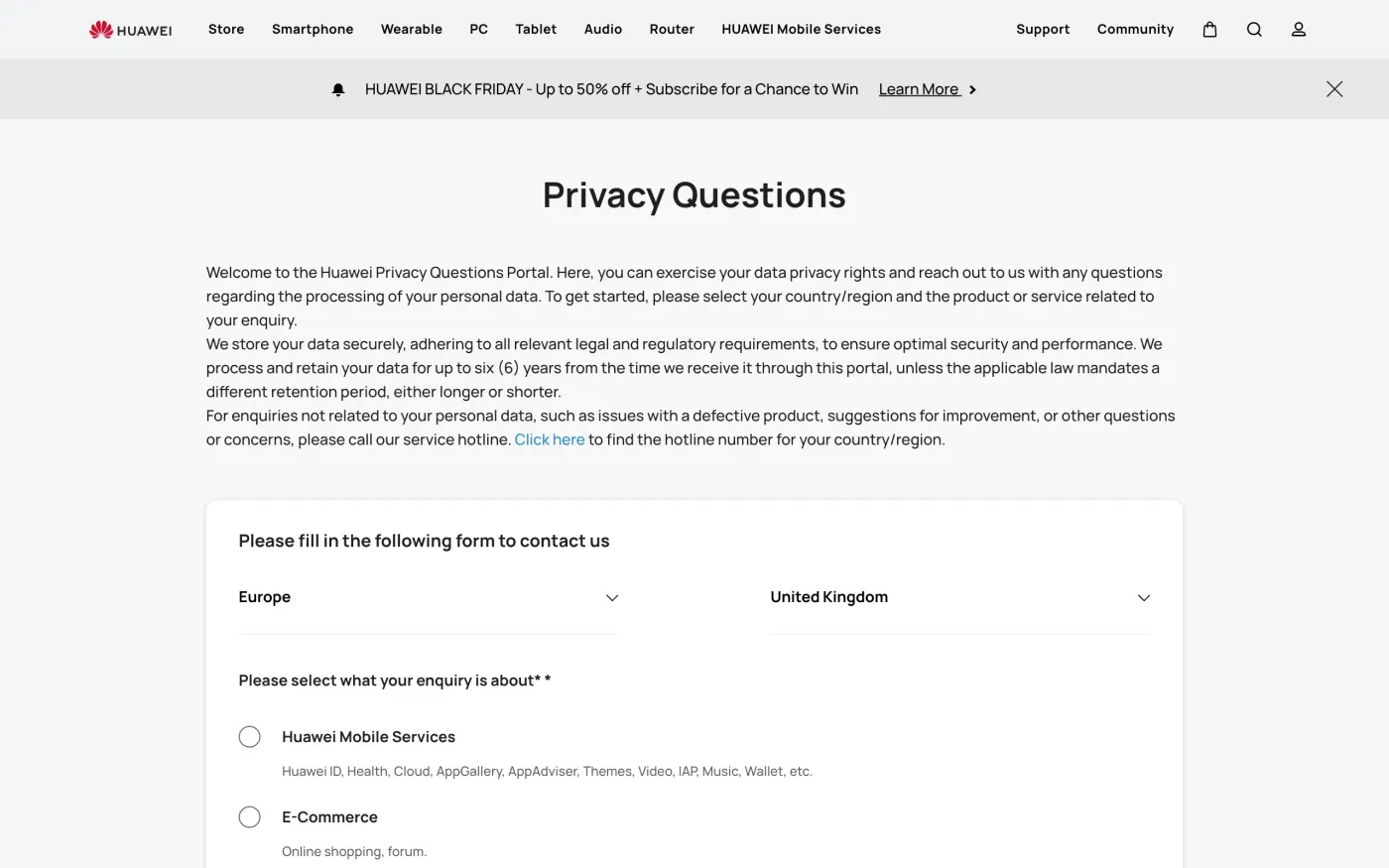
For people with a HUAWEI ID the portal says “Please click here to use your rights”, which opens a privacy tool at privacy.consumer.huawei.com/tool. That tool starts with a login, so I could not check what it asks for. People without a HUAWEI ID get an online form instead.
Who is the company
For Huawei Mobile Services the portal prints this address: “Aspiegel SE, 3rd floor, Mespil Court, Mespil Road, Ballsbridge, Dublin 4, D04 E516, Ireland.” Its UK online store notice names the same company: “Aspiegel SE, who is the data controller of your HUAWEI ID”. The portal also prints “Huawei Services (Hong Kong) Co., Limited, Room 03, 9/F, Tower 6, The Gateway, No.9 Canton Road, Tsim Sha Tsui, Kowloon, Hong Kong”. Which one applies depends on your country and the product you choose, so write the controller’s name from the form, not from this guide.
Huawei’s 2018 announcement says Aspiegel took over HUAWEI Mobile Services, including HUAWEI ID, Themes and Mobile Cloud, for users in the EEA and several other countries.
Huawei Cloud, the business cloud at huaweicloud.com, runs separate privacy pages. This guide covers the consumer HUAWEI ID, Mobile Cloud and the other consumer services.
The UK has a separate company
The UK website and online store have their own notice, last updated 13 March 2026. It says the controller is “Huawei Technologies (UK) Co., Ltd., a company incorporated in England and Wales whose registered address is Earley East, Thames Valley Park Drive, Reading, RG6 1PT”. Its Data Protection Officer is “Huawei DPO Office, Hansaallee 205, 40549 Düsseldorf, Germany”, and it names the ICO as the authority. The notice says to send rights requests through the Privacy Questions page. Even in the UK, the HUAWEI ID itself belongs to Aspiegel SE.
What Huawei keeps
I could not open Huawei’s separate HUAWEI ID privacy statement, which loads its text with scripts. The periods below come from pages I could read.
| Data | What Huawei says | Where |
|---|---|---|
| HUAWEI ID data on its servers | Cleaned up on deletion and cannot be recovered | Help centre |
| Backup and log files | Cleaned up automatically within six months | Help centre |
| What you send through the portal | Kept for up to six years, unless law sets another period | Privacy Questions page |
| UK store account | HUAWEI ID information kept until you deregister, then deleted | UK privacy notice |
| Some store promotions and activities | Activity-specific data kept for 7 years | UK privacy notice |
The six years for portal requests means the request you send is itself kept. That is a normal record of what you asked and what Huawei did, and the GDPR lets a company keep what it needs to prove it answered (Article 17(3)(e)). Ask Huawei to say what else it keeps and why.
Will Huawei ask for ID
Section 5.1 requires “sufficient information for Huawei to verify their identities”. It also says a request can be declined when the identity cannot be verified. Give the HUAWEI ID (the email address or phone number it was registered with, which the portal asks for in the form), and nothing more at first. Under Article 12(6) of the GDPR, Huawei can ask for more only if it has reasonable doubt about who you are.
The letter
The portal asks you to describe your request in a text box. Paste the letter there, fill in your HUAWEI ID where it says to, and choose Execution of data subject rights. For a copy of your data first, use the access version.
Dear Huawei privacy team,
Under Article 17 of the GDPR, I ask you to erase all the personal data you hold about me.
My account uses the email address [your account email]. If you keep any of my data, please tell me what you keep and the legal reason.
Please answer within one month of receiving this request, as Article 12(3) of the GDPR requires.
Kind regards,
[Your name]
Dear Huawei privacy team,
Under Article 15 of the GDPR, I ask for a copy of all the personal data you hold about me.
Please also tell me why you use it, what kinds of data you hold, who you have shared it with, how long you will keep it, where you got it if not from me, and whether you make automated decisions about me.
My account uses the email address [your account email].
Please answer within one month of receiving this request, as Article 12(3) of the GDPR requires.
Kind regards,
[Your name]
In the UK, use the versions that cite the UK GDPR. The UK right to be forgotten guide explains them.
Dear Huawei privacy team,
Under Article 17 of the UK GDPR, I ask you to erase all the personal data you hold about me.
My account uses the email address [your account email]. If you keep any of my data, please tell me what you keep and the legal reason.
Please answer within one month of receiving this request, as Articles 12(3) and 12A of the UK GDPR require.
Kind regards,
[Your name]
For deadlines and what Huawei must tell you if it refuses, see the deletion letter guide and the guide to getting a copy of your data.
More accounts than Huawei?
Reflex finds the companies in your Gmail, sends this letter to each from your own address and follows up for three months. Free to join the beta, €19 once when you start.
If Huawei does not answer
Huawei says it will “make every effort to respond within one month”, extendable if it tells you why. The GDPR sets one month, extendable by two only with an explanation in the first month (Article 12(3)), and the response deadline guide shows how to count it. Keep a screenshot of the portal’s confirmation, since the portal is the only proof you sent it. After one month, use the portal again to send a reminder and see what to do if a company ignores your request.
Huawei’s privacy statement names no lead authority. It tells you to complain to your local privacy regulator. Because Aspiegel SE is in Dublin, the lead authority for HUAWEI ID complaints is probably Ireland’s Data Protection Commission, which says to contact the company in writing first and takes complaints through a web form or at info@dataprotection.ie. You can also complain where you live, and the authority passes the case on (Articles 56 and 77). The EDPB lists the national authorities. In the UK, complain to the ICO.
If your account is on a phone you also use for other services, see how to delete accounts at Samsung, Apple and Google.
Questions
How do I delete my HUAWEI ID?
On your phone or tablet, Huawei's help centre says to go to Settings, then Log in with HUAWEI ID, then Privacy centre, then Delete account. You need to be logged in, and a child account must be deleted first.
Can I email Huawei to delete my data?
You can, but Huawei's privacy statement says a request by email, hotline or online chat is answered by pointing you to an official channel. Use the Privacy Questions portal, the My HUAWEI app or the HUAWEI ID Privacy centre.
Does deleting my HUAWEI ID delete my Huawei Cloud photos?
Huawei's help centre says that after deletion you can no longer use the account for Cloud, AppGallery or third-party apps, and that personal data on the server is cleaned up and cannot be recovered. Save anything you want first.
How long does Huawei keep data after I delete my account?
The help centre says backup and log files on the server are cleaned up automatically within six months. Some other Huawei services have their own periods, for example 7 years for some store promotions.
Who regulates Huawei in the EU?
Huawei's privacy statement does not name a lead authority. Aspiegel SE, which Huawei names as the controller of the HUAWEI ID, is in Dublin, so the Irish Data Protection Commission is the likely lead. You can complain to the authority where you live instead.
Sources
- Huawei Consumer Business Privacy Statement, Last updated July 2026, section 5.1 and section 10Huawei, checked 16 November 2026
- Privacy QuestionsHuawei, checked 16 November 2026
- How to delete my HUAWEI ID accountHuawei, checked 16 November 2026
- How to delete my HUAWEI IDHuawei, checked 16 November 2026
- When you associate a phone number or social account with your HUAWEI IDHuawei, checked 16 November 2026
- Privacy Notice (UK website and online store), Last updated 13 March 2026Huawei Technologies (UK) Co., Ltd., checked 16 November 2026
- Aspiegel announcementHuawei, checked 16 November 2026
- Making a complaint with the DPCData Protection Commission (Ireland), checked 16 November 2026
- Members of the EDPB, national data protection authoritiesEuropean Data Protection Board, checked 16 November 2026
- Regulation (EU) 2016/679, the GDPR, Articles 12, 17, 56 and 77EUR-Lex, checked 16 November 2026
- Make a complaintICO, checked 16 November 2026