
Cancel first, or the deletion is refused
Viaplay’s help centre has one article for deleting an account. It sends you to a form, and it sets two conditions before you submit it:
You use the same email address that is linked to your Viaplay account.
You do not have any active package on the account – this applies to all packages purchased directly through us, our partners, or via Apple.
It then says: “We cannot delete an account that has an active package linked to it. To start the process, you must first cancel your package on Viaplay under My account > Package information.”
Cancelling a package does not close the account, and an account with a package still running cannot be deleted. Viaplay’s cancellation page (in Swedish) says that if you cancel, your account stays with Viaplay and it is easy to come back.
| How you pay for Viaplay | Where to cancel, per Viaplay |
|---|---|
| Directly to Viaplay | Log in, go to My account, then Package information, then Cancel package, in a web browser |
| Through a TV or mobile provider such as Telia, Tele2, Telenor or Sappa | With that provider. Viaplay says you must contact them to cancel |
| Through Apple | With Apple. Viaplay says you cancel it directly with them |
A cancelled package keeps running until the end of the period you paid for, and longer if you have a binding period. You can send the form only once nothing is active, so for most people the deletion has to wait for that date. Any film you bought with a licence period also keeps the account alive, according to the privacy notice, until the licence ends.
The deletion form
The article is at help.viaplay.com/is/delete-account/ in English and help.viaplay.com/sv/delete-account/ in Swedish. Its link to the form goes to a page that is part of your country’s Viaplay site. For Sweden that is viaplay.se/se-sv/privacy/rights. It is the same form the privacy notice means by “To exercise them, please submit your request here.”
- Cancel every package.
Direct, through a partner and through Apple. Wait until the last one has ended.
- Open the form from the help article.
Use the link in the article for your language, so you reach your country’s version.
- Use the email address on your account.
Viaplay says to use the same email address that is linked to your account. This is how it checks the request is yours.
- Click the link in the confirmation email.
Viaplay emails you to confirm the request. Without that click it is not complete. Check your spam folder if nothing arrives.
- Wait up to one month.
Viaplay says that after you confirm, the account and associated data are deleted within one month.
This guide quotes only what the help article and privacy notice say about the form. If it asks for more than your email address, give only what Viaplay needs to find your account.
Where to write instead of the form
Which route the privacy notice names depends on the version. The current English notice (effective 5 May 2026) and the Nordic pages send you to the form. The UK statement, last updated 1 February 2024, says:
If you wish to exercise any of your rights as described under section 7 above or need help from our customer service, such requests shall be sent to privacy@viaplay.com.
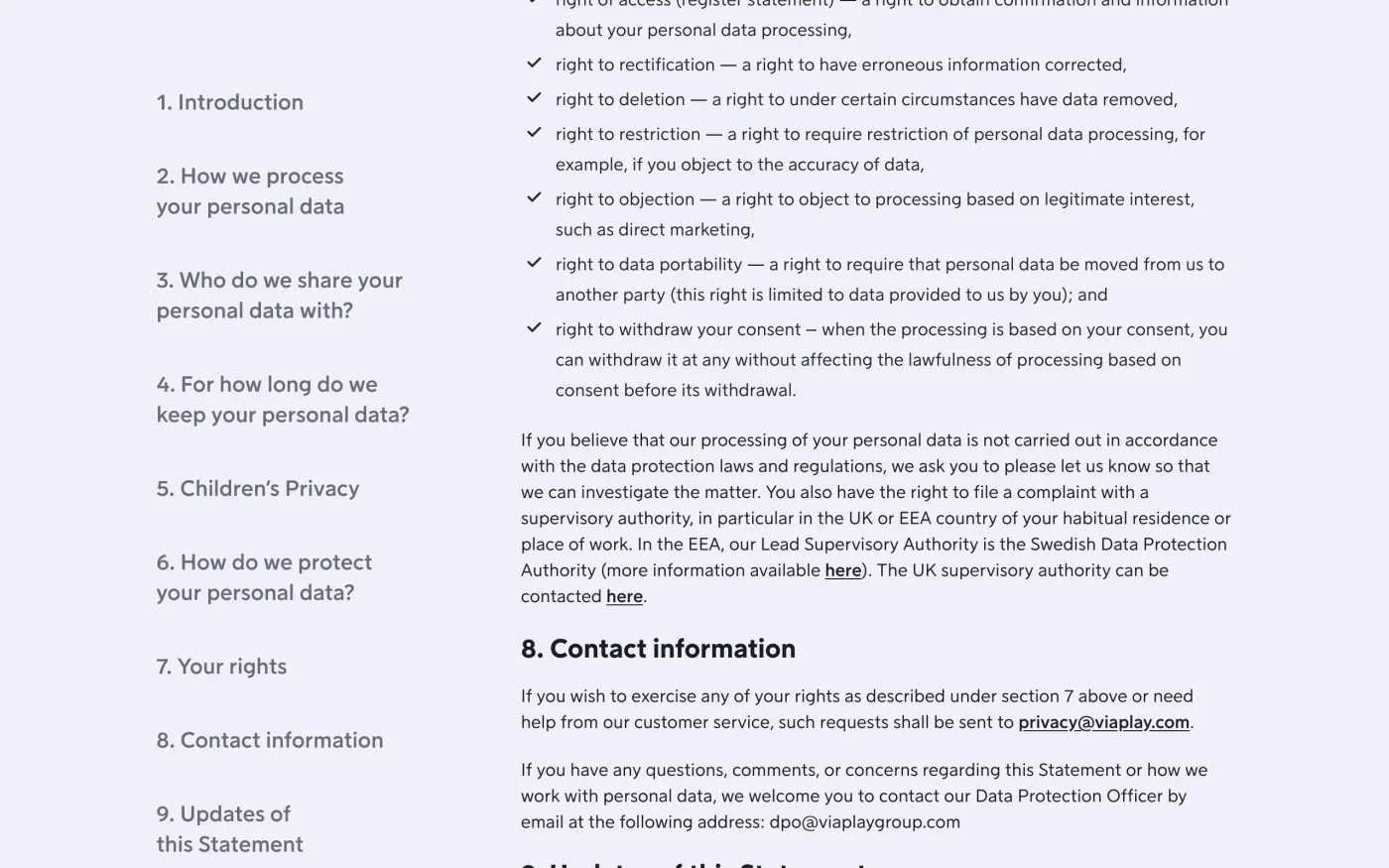
Both versions give the data protection officer as dpo@viaplaygroup.com. Use that address if the form fails, the confirmation email never comes, or the month passes. Send the letter below in the body of the email and say which package you cancelled and on what date.
Who holds your data
The controller for Viaplay is Viaplay Group Sweden AB, company number 556304-7041, Box 171 04, 104 62 Stockholm, Sweden. The English notice calls it “the data controller”.
In the UK the statement adds a second company. Viaplay Group UK Limited, Chiswick Green, 610 Chiswick High Road, W4 5RU London, is “a joint data controller together with Viaplay Group Sweden AB”. Customers who bought through Premier Media Broadcasting Limited are served by Viaplay Group Ireland Limited, Broadcasting House, 3a Prince’s Street South, Dublin 2, D02 A520, which is also a joint controller. For both, the statement says to use the contact details in its section 8, so one request covers the group.
What Viaplay keeps after deletion
Section 6 of the privacy notice, How long we keep your data, says what happens to the account itself:
If your account is deleted due to inactivity or upon request, your personal data will be anonymised.
The records tied to money are kept for years, and the number depends on which country’s page you read:
| Viaplay page | Transaction data and purchases kept for |
|---|---|
| English notice (5 May 2026) | 10 years after the transaction date |
| Sweden, viaplay.se | 8 years |
| Denmark, viaplay.dk | 5 years |
| Norway, viaplay.no | 10 years |
| Finland, viaplay.fi | 10 years |
| UK statement (1 February 2024) | 7 years |
Viaplay does not say which law sets each period. Ask for the reason in your letter, since keeping data to meet a legal obligation is an exception to erasure under Article 17(3)(b) of the GDPR. The same section lists the shorter periods:
| Data | How long Viaplay says it keeps it |
|---|---|
| Crash logs and files | Up to 3 months from collection |
| Customer service logs and text chats | Up to 3 years |
| Customer service voice recordings | 1 month |
| Competition or user research entries | 6 months after it ends |
| Usability testing | 12 months after completion |
| Direct marketing data | Until you opt out or object |
| An account you stop using | Deleted after 48 months of inactivity, unless you hold a licence for content that is still valid |
Viaplay also reserves the right to keep data for longer when it is needed for a legal claim, and says it deletes it as soon as the claim is final.
Get a copy before you delete
Once the account is deleted, Viaplay anonymises what it can, so a copy has to come first. Ask for one with the same form or the email route, and wait for it before you cancel the last package. The subject access request guide explains what Viaplay has to send you and by when.
The letter
Use this if the form does not work for you, or to ask in writing what Viaplay keeps and why. Send it from your account email to the address in the privacy statement for your country, or to dpo@viaplaygroup.com. If you are in the UK, the UK version cites the UK GDPR; the UK guide explains it.
Dear Viaplay privacy team,
Under Article 17 of the GDPR, I ask you to erase all the personal data you hold about me.
My account uses the email address [your account email]. If you keep any of my data, please tell me what you keep and the legal reason.
Please answer within one month of receiving this request, as Article 12(3) of the GDPR requires.
Kind regards,
[Your name]
If you want the copy first, use this one instead:
Dear Viaplay privacy team,
Under Article 15 of the GDPR, I ask for a copy of all the personal data you hold about me.
Please also tell me why you use it, what kinds of data you hold, who you have shared it with, how long you will keep it, where you got it if not from me, and whether you make automated decisions about me.
My account uses the email address [your account email].
Please answer within one month of receiving this request, as Article 12(3) of the GDPR requires.
Kind regards,
[Your name]
For the deadlines and what Viaplay must tell you if it refuses, see the deletion letter guide and the guide to response deadlines.
More subscriptions than Viaplay?
Reflex finds the companies in your Gmail, sends this letter to each from your own address and follows up for three months. Free to join the beta, €19 once when you start.
If Viaplay does not answer
Viaplay has one month from your request to answer, extendable by two months only if it tells you why within the first month (Article 12(3)). Its own help article promises deletion within one month of your confirmation click. If that passes, write to dpo@viaplaygroup.com with the date you confirmed, then follow the guide to ignored requests.
Viaplay’s privacy notice names its lead authority:
Our lead data protection authority is the Swedish Data Protection Authority (Integritetsskyddsmyndigheten). You can email them at imy@imy.se or call at 08-657 61 00.
The notice also says you may complain to an authority in the country where you usually live or work. Article 77 gives you that right. In the UK, complain to the ICO. If you have other streaming accounts to clear out, see the guides for Netflix, Disney+ and HBO Max.
Questions
Why will Viaplay not delete my account?
Its help centre says it cannot delete an account that has an active package linked to it. That includes packages bought directly, through its partners or via Apple. Cancel the package first, then submit the deletion form.
Does cancelling my Viaplay subscription delete my account?
No. Viaplay's cancellation page says that when you cancel a package, your account stays with Viaplay so you can come back at any time. Deleting the account is a separate request.
How long does Viaplay take to delete an account?
Its help centre says the account and associated data are deleted within one month after you confirm the request by clicking the link in the email it sends you.
Does Viaplay keep my purchase history?
Yes, for a set number of years. Its privacy notice says transaction data is kept for 10 years in the English notice, and the Swedish, Danish, Norwegian and Finnish pages give 8, 5, 10 and 10 years.
Who regulates Viaplay?
Viaplay names the Swedish Authority for Privacy Protection (Integritetsskyddsmyndigheten, IMY) as its lead data protection authority. You can also complain where you live.
Sources
- Delete your Viaplay AccountViaplay, checked 16 November 2026
- Radera ditt Viaplay kontoViaplay, checked 16 November 2026
- Säg upp paket, Having Viaplay through a partner or AppleViaplay, checked 16 November 2026
- Viaplay Privacy Notice (English, effective 5 May 2026), Sections 1, 6, 8 and 9Viaplay, checked 16 November 2026
- Dataskydd och Viaplay (Sweden), Sections 6 and 8Viaplay, checked 16 November 2026
- Databeskyttelse og Viaplay (Denmark), Transaktionsdata og købViaplay, checked 16 November 2026
- Personvern og Viaplay (Norway), Transaksjonsdata og kjøpViaplay, checked 16 November 2026
- Tietosuoja ja Viaplay (Finland), Tapahtumatiedot ja ostotViaplay, checked 16 November 2026
- Viaplay Privacy Statement (UK), Sections 1, 4, 7 and 8; last updated 01.02.2024Viaplay, checked 16 November 2026
- IntegritetsskyddsmyndighetenSwedish Authority for Privacy Protection, checked 16 November 2026
- Regulation (EU) 2016/679, the GDPR, Articles 12, 17 and 77EUR-Lex, checked 16 November 2026
- Make a complaintICO, checked 16 November 2026