
Closing the account comes second
At PayPal the order matters. Closing an account cannot be undone, and the self-service download tool sits inside the account you are about to close. If you want a copy of your payment history, take it first, then close.
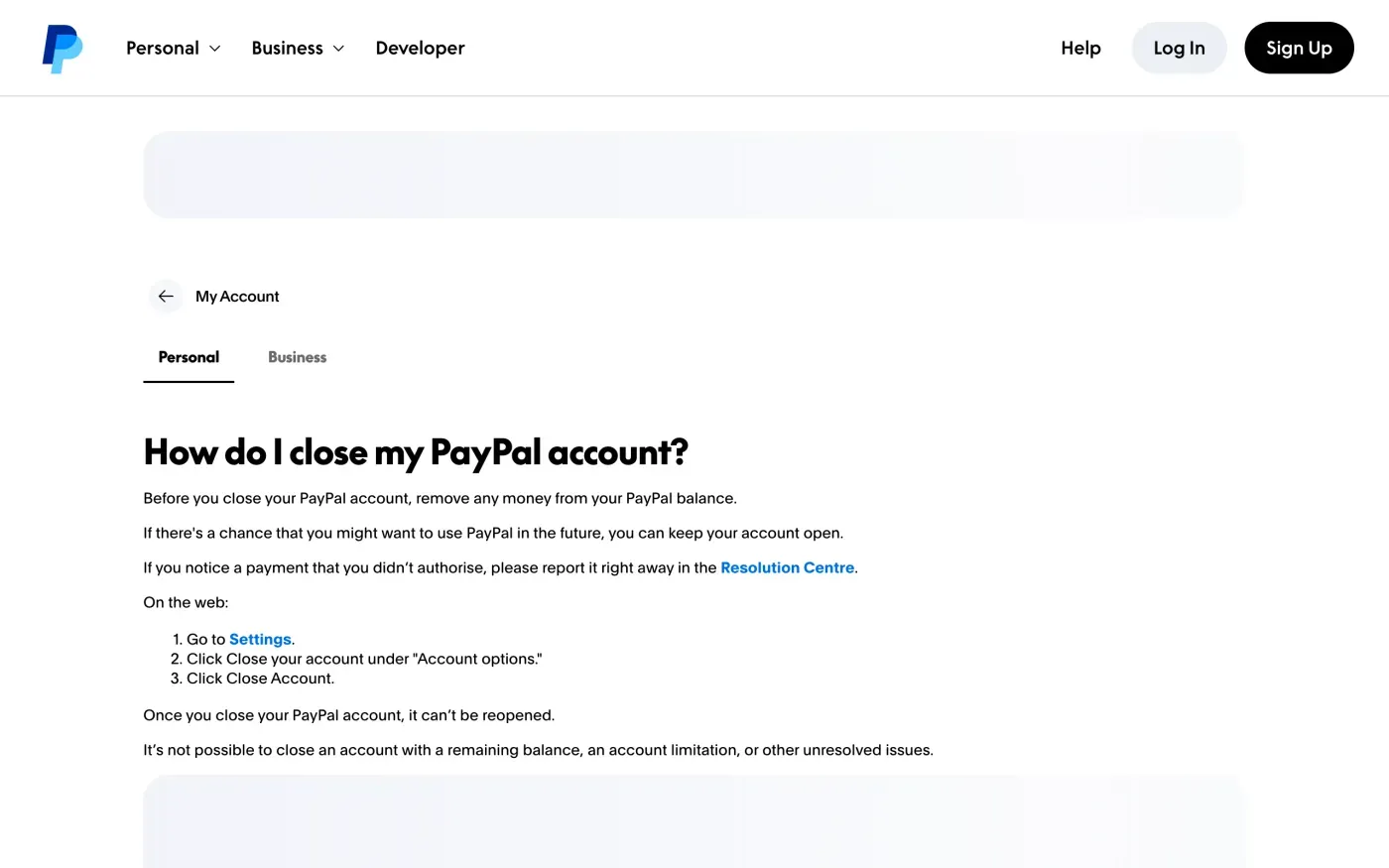
PayPal’s help article on closing an account gives these steps on the web:
- Move your money out.
PayPal says to remove any money from your PayPal balance before you close the account.
- Go to Settings.
Log in and open Settings.
- Click Close your account.
It sits under “Account options”.
- Click Close Account.
PayPal says that once you do, the account can’t be reopened.
When PayPal will not let you close it
The help article says: “It’s not possible to close an account with a remaining balance, an account limitation, or other unresolved issues.” So there are three things to clear.
| What blocks you | What to do |
|---|---|
| A remaining balance | Withdraw it or spend it. Do this before the download too, since the balance shows in your records. |
| An account limitation | You have to resolve it with PayPal first. You can still send an erasure request while it is in place, and PayPal has to answer it in writing. |
| Other unresolved issues | An open dispute or a pending payment counts. Settle it, or name it in your letter and ask what PayPal will do with the data in the meantime. |
A limitation does not stop you using your rights. The deadline in Article 12(3) of the GDPR runs from the day PayPal receives your request, whatever state the account is in. See the response deadline guide for how the month is counted.
Download your data before you close
PayPal has a download tool for personal accounts. Its help article says:
Personal account customers may download their personal data following these steps: Go to Settings. Click Data & Privacy. Click Download your data. Select data options, and click Submit Request.
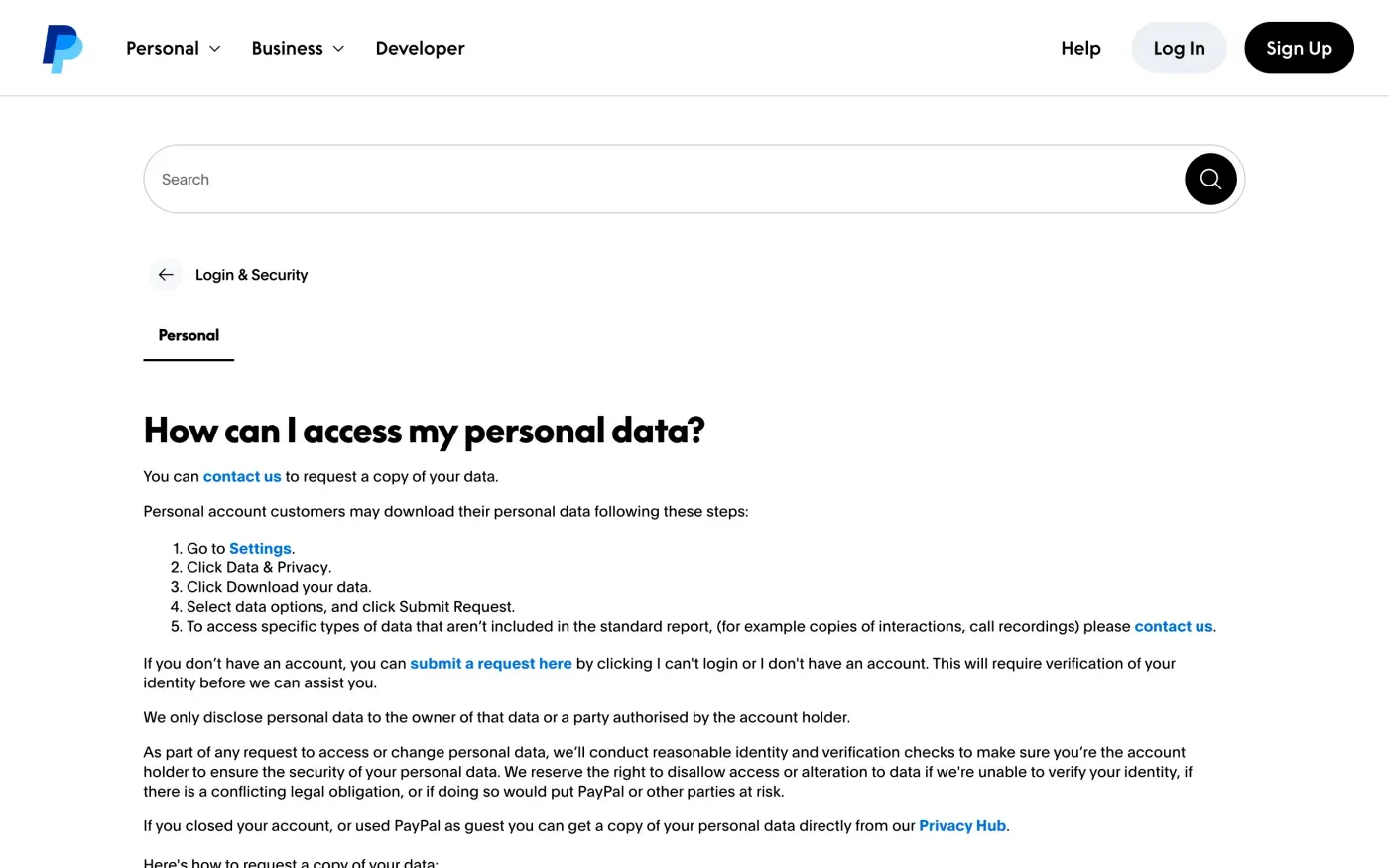
The download is the standard report only. For anything else, send a request for a copy of your data using the subject access request guide. The letter there asks for everything PayPal holds, which is more than the tool exports.
In the app, the help centre describes the same route: profile icon, Data & privacy, Download your data.
If you cannot log in, or the account is already closed
You do not need a working login to ask. PayPal’s help article says:
If you closed your account, or used PayPal as guest you can get a copy of your personal data directly from our Privacy Hub.
For people with no account it adds: “If you don’t have an account, you can submit a request here by clicking I can’t login or I don’t have an account. This will require verification of your identity before we can assist you.”
PayPal says it will “conduct reasonable identity and verification checks” and reserves the right to refuse access “if we’re unable to verify your identity, if there is a conflicting legal obligation, or if doing so would put PayPal or other parties at risk.” Under Article 12(6) of the GDPR a company may ask for more information only when it has reasonable doubts about who you are. Give it what it needs to find the account, such as the email address and the last payment, and nothing more.
Where to send an erasure request
PayPal publishes its privacy statement on a page that also lists the contact route for your rights. That page refused to load for our automated check on 15 November 2026, so this guide quotes no address from it and does not guess one. Open the PayPal privacy statement for your country (the UK version is linked in the sources), find the sections on your rights and on how to contact PayPal about privacy, and use the form or address printed there. If it gives only a web form, use the form and keep a copy of what you sent.
Check which PayPal company your notice names as responsible for your account. The privacy statement is published per country and the company can differ between the UK and the EU, so the controller named on your own country’s page is the one to address.
The letter
Closing the account does not ask PayPal to erase anything. The letter below does, under Article 17, and asks PayPal to say what it keeps and the legal reason. Paying a financial service usually means some records are kept for years under money-handling rules, which Article 17(3)(b) allows. What you are entitled to is a written answer that names them.
Fill in your name and the email address on your account. If the account is closed, say so, and give the date.
Dear PayPal privacy team,
Under Article 17 of the GDPR, I ask you to erase all the personal data you hold about me.
My account uses the email address [your account email]. If you keep any of my data, please tell me what you keep and the legal reason.
Please answer within one month of receiving this request, as Article 12(3) of the GDPR requires.
Kind regards,
[Your name]
In the UK, use the UK version of the letter, which cites the UK GDPR. For what the letter means and how long PayPal has to reply, see the deletion letter guide.
If you want a copy first, send this one before the deletion letter:
Dear PayPal privacy team,
Under Article 15 of the GDPR, I ask for a copy of all the personal data you hold about me.
Please also tell me why you use it, what kinds of data you hold, who you have shared it with, how long you will keep it, where you got it if not from me, and whether you make automated decisions about me.
My account uses the email address [your account email].
Please answer within one month of receiving this request, as Article 12(3) of the GDPR requires.
Kind regards,
[Your name]
More accounts than PayPal?
Reflex finds the companies in your Gmail, sends this letter to each from your own address and follows up for three months. Free to join the beta, €19 once when you start.
If PayPal does not answer
PayPal has one month from receiving your request, extendable by two more only if it tells you why in the first month. If that passes, send a reminder from the guide to ignored requests.
If there is still nothing, you can complain to the data protection authority where you live under Article 77. The EDPB keeps the list of national authorities. In the UK, complain to the ICO. To see which other companies hold your data, use the guide to finding companies.
Questions
Does closing my PayPal account delete my data?
Not by itself. PayPal's help article only describes closing the account. To have your personal data erased, send an erasure request under Article 17 of the GDPR and ask PayPal to say what it keeps and why.
Why can't I close my PayPal account?
PayPal's help article says it is not possible to close an account with a remaining balance, an account limitation, or other unresolved issues. Withdraw the balance and resolve the limitation first, or send an erasure request anyway.
Can I get my PayPal data if my account is closed or I used guest checkout?
Yes. PayPal's help article says people who closed their account or used PayPal as a guest can get a copy of their data from its Privacy Hub. People with no account can use the "I can't login or I don't have an account" option in the contact portal, which needs identity verification.
How do I download my PayPal data?
On a personal account, go to Settings, then Data & Privacy, then Download your data, pick the data options and click Submit Request. Things the standard report leaves out, such as call recordings, have to be requested through PayPal's contact page.
Can I reopen a PayPal account after closing it?
No. PayPal says a closed account can't be reopened.
Sources
- How do I close my PayPal account?PayPal, checked 15 November 2026
- How can I access my personal data?PayPal, checked 15 November 2026
- PayPal privacy statement, Contact, rights and retention sectionsPayPal, checked 15 November 2026
- Regulation (EU) 2016/679, the GDPR, Articles 12, 15, 17 and 77EUR-Lex, checked 15 November 2026
- Members of the EDPB, national data protection authoritiesEuropean Data Protection Board, checked 15 November 2026
- Make a complaintICO, checked 15 November 2026