
What deleting a Nintendo Account takes with it
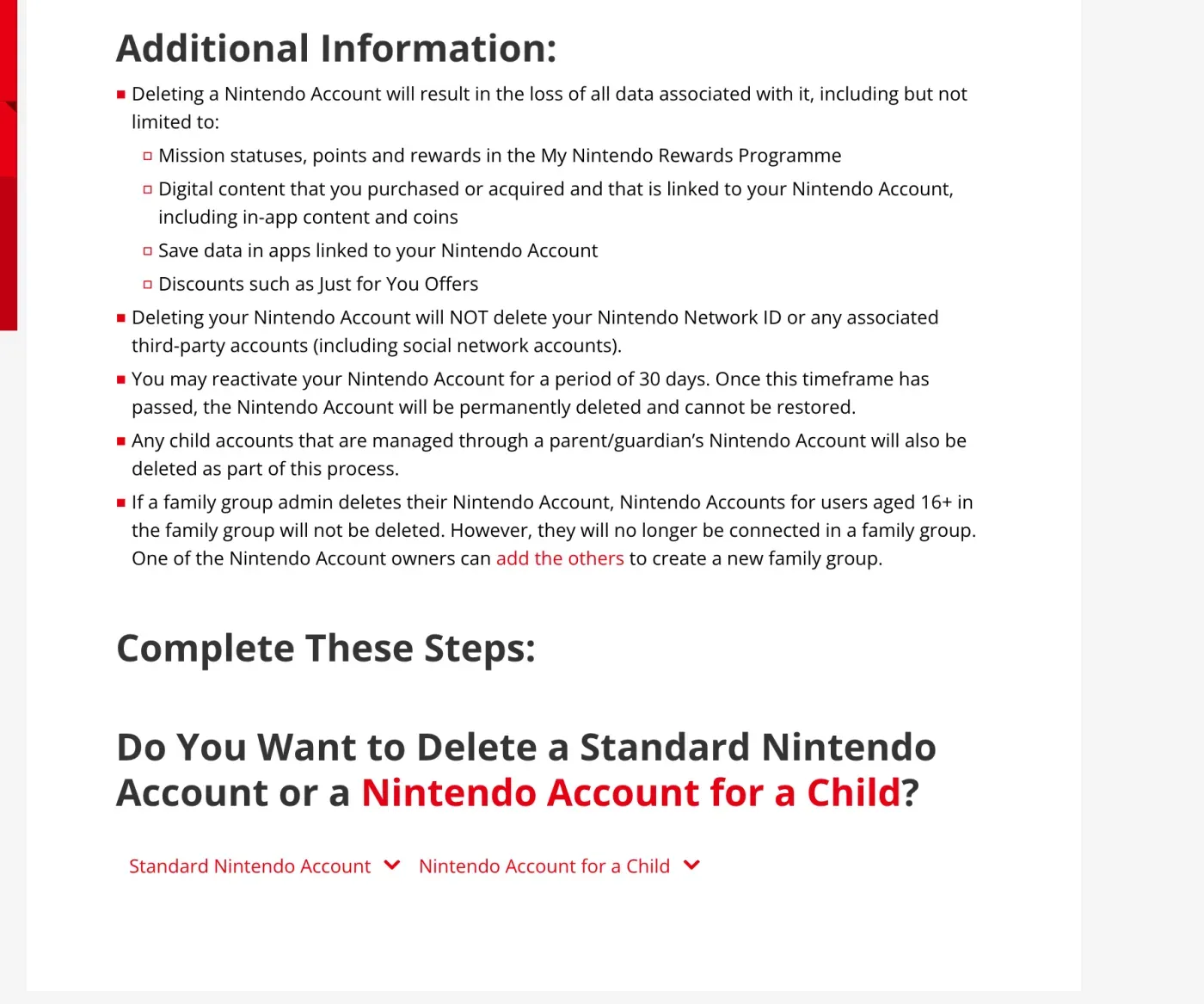
One Nintendo Account sits under every console, game and service you use, so deleting it removes more than a profile. Nintendo’s help article “How to Delete a Nintendo Account” says deletion results in the loss of all data associated with the account, “including but not limited to”:
- Mission statuses, points and rewards in the My Nintendo Rewards Programme
- Digital content you purchased or acquired that is linked to the account, including in-app content and coins
- Save data in apps linked to the account
- Discounts such as Just for You Offers
Three more details from the same article matter if you share a household:
- Deleting the account does not delete your Nintendo Network ID or any linked third-party accounts.
- Any child accounts managed through your account are deleted too.
- If you are the admin of a family group, accounts for users aged 16 and over survive but leave the group.
For a standard account, the article’s steps start from your Nintendo Account settings, under Privacy and Other Settings, and ask you to confirm with your password, a passkey or an email code. Child accounts are deleted from the parent or guardian’s account. The page gives no way to delete without signing in, so if you cannot sign in, the GDPR route below is the one to use.
Who holds your data: two companies
Nintendo has two controllers for the same account. The Nintendo Account Privacy Policy opens by naming them:
Nintendo Co., Ltd., 11-1 Hokotate-cho, Kamitoba, Minami-ku, Kyoto, 601-8501, Japan (“NCL”) and Nintendo of Europe SE, Goldsteinstrasse 235, 60528 Frankfurt am Main, Germany (“NOE”)
It says each is “solely responsible for their own data processing activities” and each is the controller for its own. In practice NCL, the Japanese parent, primarily collects what you submit through the account, while NOE collects data when you buy from Nintendo shopping services in Europe or register licences. That is why the retention rule below is tied to NOE.
You do not need to write to Japan. For NCL as controller, the policy’s contact section names Nintendo of Europe SE as its European representative at the same Frankfurt address.
Where to send your request
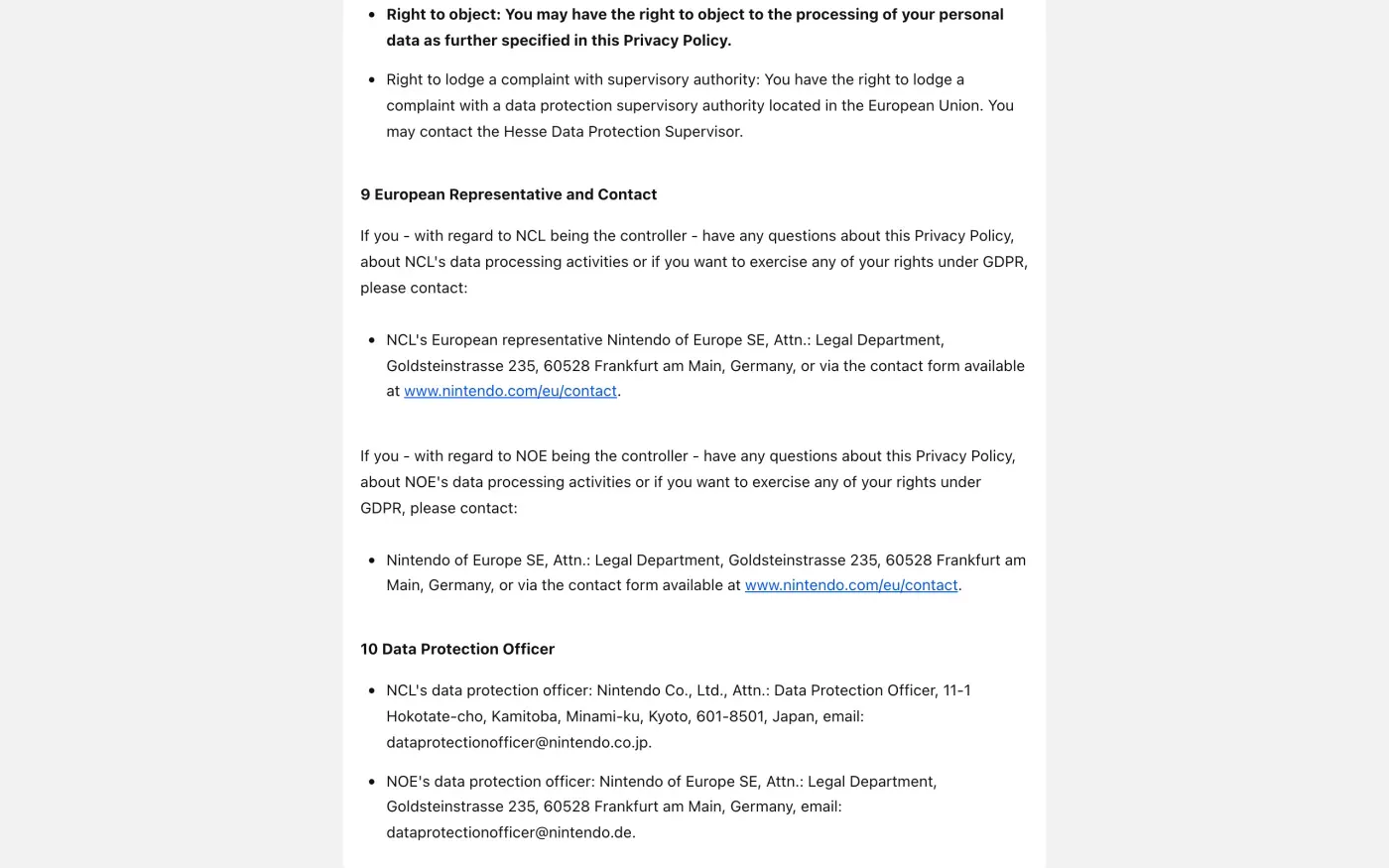
Section 9 of the Nintendo Account Privacy Policy, European Representative and Contact, gives the same route for both companies:
Nintendo of Europe SE, Attn.: Legal Department, Goldsteinstrasse 235, 60528 Frankfurt am Main, Germany, or via the contact form available at www.nintendo.com/eu/contact.
| Route | Details as Nintendo publishes them |
|---|---|
| Post | Nintendo of Europe SE, Attn.: Legal Department, Goldsteinstrasse 235, 60528 Frankfurt am Main, Germany |
| Contact form | nintendo.com/eu/contact |
| Data protection officer, NOE | dataprotectionofficer@nintendo.de |
| Data protection officer, NCL | dataprotectionofficer@nintendo.co.jp (Nintendo Co., Ltd., Attn.: Data Protection Officer, Kyoto) |
The contact form first asks you to pick your country, so it is a web form rather than an email address. The policy lists no other email address for requests, so use the data protection officer address if you want a written trail, and say in the subject line that it is a data protection request. The policy does not describe a self-service data download, so a written request is how you ask for a copy.
Ask for a copy before you delete
Deleting removes the account and the purchase records tied to it. If you ever need proof of what you bought, ask for a copy of your data first. Nintendo’s policy says you have the right of access, and that you can exercise it by contacting Nintendo as in section 9. Article 15 of the GDPR also gives you the purposes, recipients and retention periods. The subject access request guide explains what to expect.
Send this from the email address your Nintendo Account uses.
Dear Nintendo privacy team,
Under Article 15 of the GDPR, I ask for a copy of all the personal data you hold about me.
Please also tell me why you use it, what kinds of data you hold, who you have shared it with, how long you will keep it, where you got it if not from me, and whether you make automated decisions about me.
My account uses the email address [your account email].
Please answer within one month of receiving this request, as Article 12(3) of the GDPR requires.
Kind regards,
[Your name]
UK readers can find the version that cites the UK GDPR in the subject access request guide.
Deleting in settings or asking under the GDPR
| Account settings | GDPR erasure request | |
|---|---|---|
| What it does | Closes the account, with a 30 day window to reactivate | Asks Nintendo to erase your personal data and to answer in writing |
| What you get in writing | Nothing | A reply covering what is erased and what is kept, and why (Article 12) |
| If you cannot sign in | Not available | Works from your account email address |
| Network ID | Not deleted | Ask about it separately in the letter |
Nintendo’s own policy treats them as equivalent for retention. It says that if you delete the account in settings, or contact Nintendo under section 9, “your personal data will be deleted”. The written request is the one that gets you an answer about what is kept.
What Nintendo keeps
Section 7 of the Nintendo Account Privacy Policy, Storage Time, gives one specific exception for deletion:
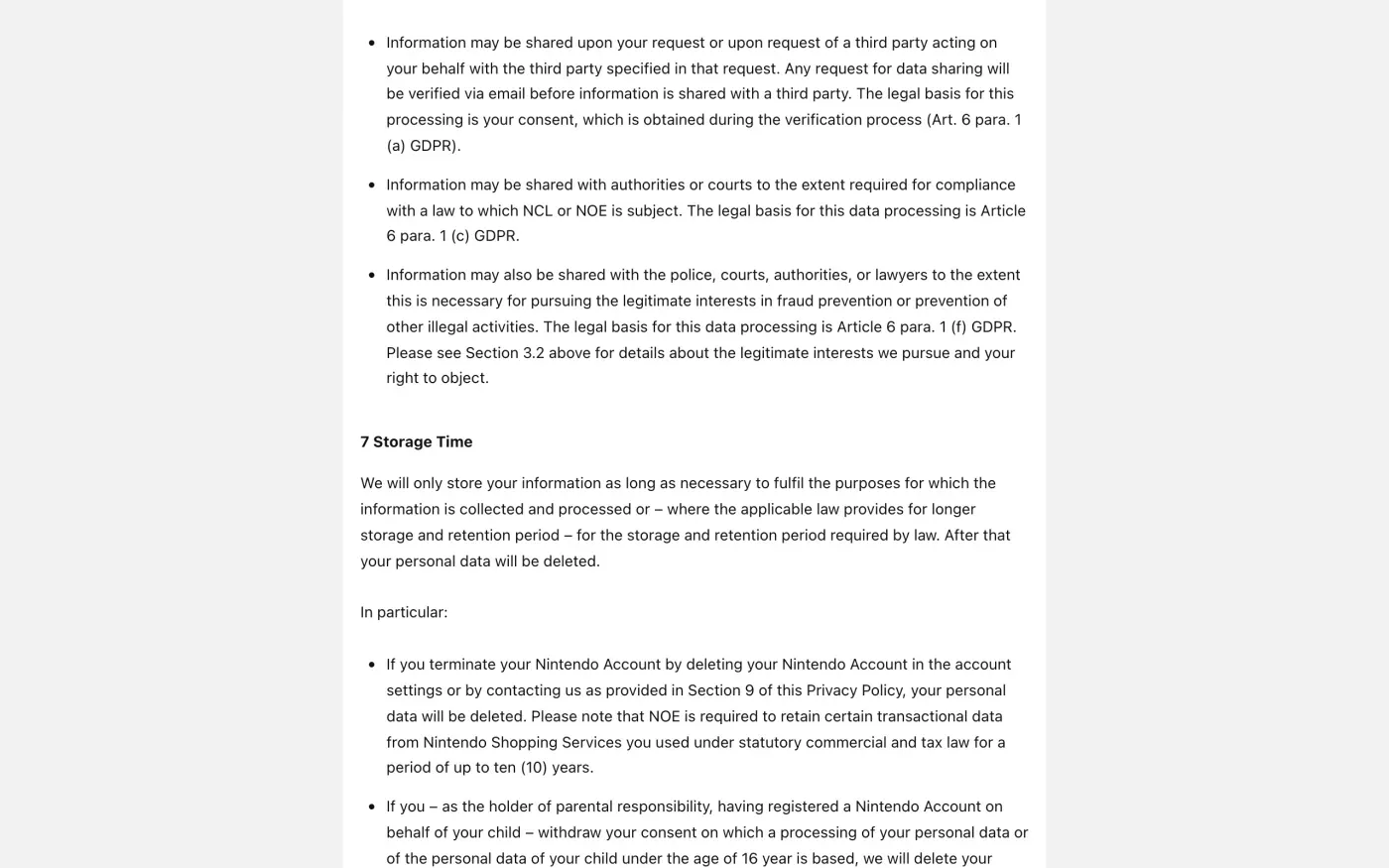
If you terminate your Nintendo Account by deleting your Nintendo Account in the account settings or by contacting us as provided in Section 9 of this Privacy Policy, your personal data will be deleted. Please note that NOE is required to retain certain transactional data from Nintendo Shopping Services you used under statutory commercial and tax law for a period of up to ten (10) years.
Order and payment records are the usual example of data a company must keep under a legal obligation (Article 17(3)(b)). The Website Privacy Policy for the Nintendo Store adds that data from a logged-in store account is deleted when you delete the Nintendo Account. Ask Nintendo to list what it keeps in the reply.
The ID check
The privacy policies describe no identity check for requests. Send the letter from the email address on your Nintendo Account and give your Nintendo Account ID or nickname. Under Article 12(6) of the GDPR, Nintendo may ask for more only if it has reasonable doubts about who you are. Do not attach a passport or console serial numbers up front.
The letter
Fill in the fields and send it to the Frankfurt address, through the contact form, or by email to dataprotectionofficer@nintendo.de. Add your Nintendo Account ID on a line of its own, and name any Nintendo Network ID, My Nintendo or Nintendo Store account you want covered.
Dear Nintendo privacy team,
Under Article 17 of the GDPR, I ask you to erase all the personal data you hold about me.
My account uses the email address [your account email]. If you keep any of my data, please tell me what you keep and the legal reason.
Please answer within one month of receiving this request, as Article 12(3) of the GDPR requires.
Kind regards,
[Your name]
If you live in the UK, use the UK right to be forgotten letter, which cites the UK GDPR. The privacy policy confirms that for UK residents, GDPR references mean the UK GDPR. For the rules on deadlines and refusals, see the deletion letter guide.
Other gaming accounts to clean up?
Reflex finds the companies in your Gmail, sends this letter to each from your own address and follows up for three months. Free to join the beta, €19 once when you start.
If Nintendo does not answer
Nintendo has one month from receiving your request to answer, or to tell you within that month why it needs up to two more (response deadline guide). If nothing arrives, send one reminder from the guide to ignored requests, and then complain.
The Nintendo Account Privacy Policy says you may contact “the Hesse Data Protection Supervisor”, and Frankfurt, where Nintendo of Europe SE sits, is in Hesse. The authority has an online complaint form, in German. You can also complain to the authority where you live (Article 77), which passes it on. In the UK, complain to the ICO.
Not sure which other companies hold your data? Finding every company that has it covers the ways to look.
Questions
Can I get my games back after I delete my Nintendo Account?
Only within 30 days. Nintendo's help centre says you may reactivate the account for 30 days, after which it is permanently deleted and cannot be restored, and it adds that it cannot guarantee all data will come back on reactivation.
Does deleting my Nintendo Account delete my Nintendo Network ID?
No. Nintendo's help article says deleting the account does not delete your Nintendo Network ID or linked third-party accounts such as social network accounts.
Who is responsible for my data at Nintendo, the Japanese or the European company?
Both, each for its own processing. The Nintendo Account Privacy Policy names Nintendo Co., Ltd. in Kyoto and Nintendo of Europe SE in Frankfurt as separate controllers. Nintendo of Europe SE is also the European representative of Nintendo Co., Ltd., so one request to Frankfurt reaches both.
Is there a separate UK controller?
Not in the policy. The same Nintendo Account Privacy Policy applies, and it says that for UK residents references to the GDPR mean the UK GDPR. Send the UK version of the letter to the same Frankfurt address.
Does Nintendo keep anything after I delete my account?
Its privacy policy says Nintendo of Europe SE must keep certain transactional data from Nintendo shopping services for up to ten years under commercial and tax law.
Sources
- Nintendo Account Privacy Policy (EN-EU, UK page), Version 03.2026. Controllers; Storage Time; Your rights under GDPR; European Representative and Contact; Data Protection OfficerNintendo, checked 15 November 2026
- Website Privacy Policy (Nintendo UK), Last updated 10.2026. Sections 7 and 8Nintendo, checked 15 November 2026
- How to Delete a Nintendo AccountNintendo, checked 15 November 2026
- Nintendo Account Was Deleted or DeactivatedNintendo, checked 15 November 2026
- Nintendo of Europe contact pageNintendo, checked 15 November 2026
- Beschwerde übermittelnDer Hessische Beauftragte für Datenschutz und Informationsfreiheit, checked 15 November 2026
- Regulation (EU) 2016/679, the GDPR, Articles 12, 15, 17, 26 and 77EUR-Lex, checked 15 November 2026
- Make a complaintICO, checked 15 November 2026