
Download first, then delete
LinkedIn’s help page on downloading your data warns: “If you close your account, you’ll no longer have access to your LinkedIn account data.” Its page on closing an account says the same: “You may want to download a copy of your data before you close your account with us.” Get your archive and check it before you delete anything.
- Open Settings & Privacy.
Click the Me icon at the top of your LinkedIn homepage and select Settings & Privacy.
- Go to Data Privacy.
Click Data Privacy on the left rail. Under the How LinkedIn uses your data section, click Download your data.
- Request the archive.
Select the data you want and click Request archive. LinkedIn says a specific type of data arrives by email within minutes and the larger download within 24 hours, with the link working for 72 hours.
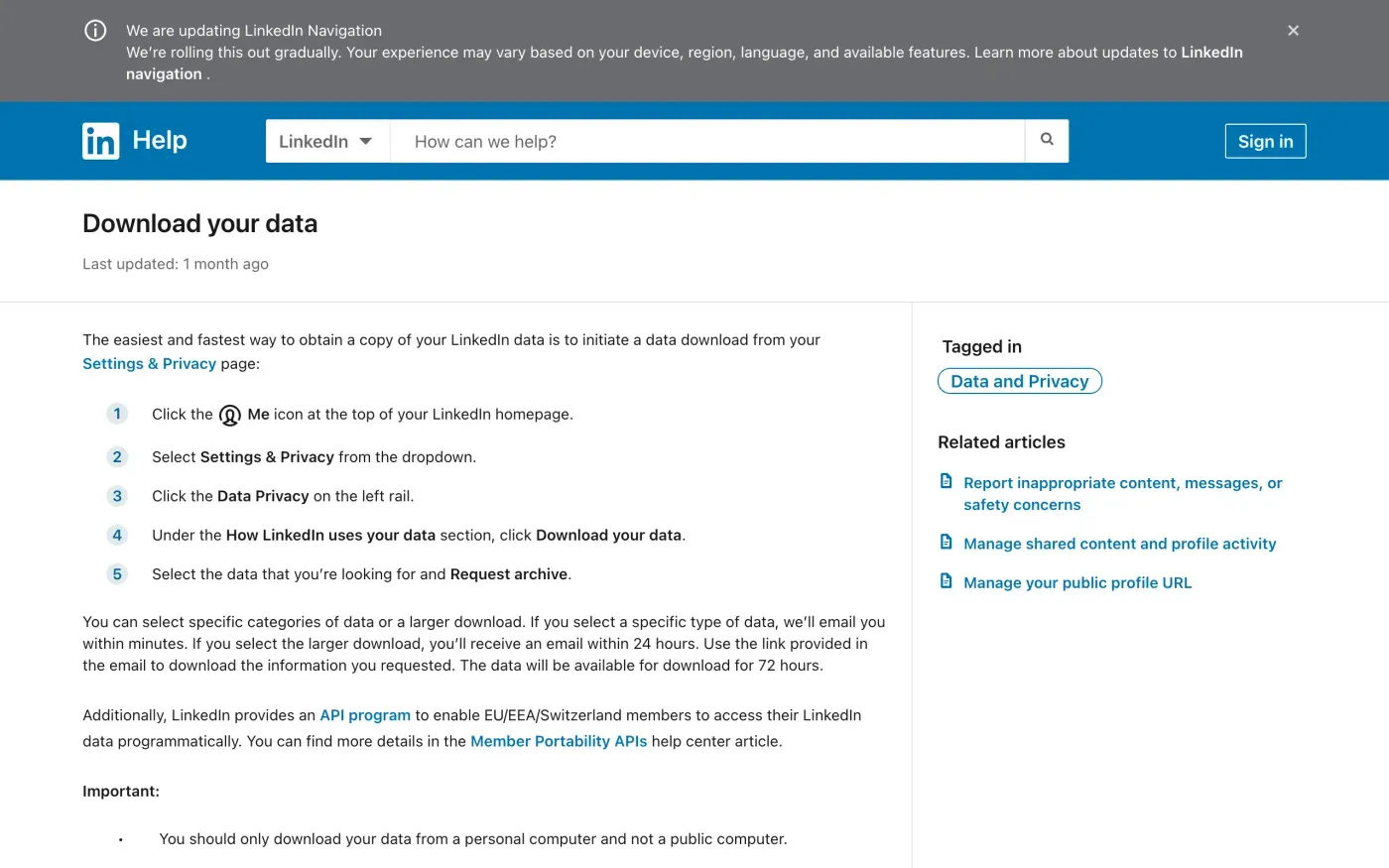
The same page says LinkedIn will not include “People You May Know or Who’s Viewed Your Profile data”, and that you only receive the categories that apply to your account. If you want everything LinkedIn holds, including what the download leaves out, the access letter below asks for it under Article 15 of the GDPR. The subject access request guide explains what you are entitled to.
Close the account
LinkedIn’s own route is in the settings. On desktop, from Settings & Privacy, under Account management in Account preferences, click Change next to Close account, pick a reason, click Next, enter your password and click Close account. In the iOS and Android apps: tap your profile picture, then Settings, then Account preferences, then Close account under Account management, then Continue. Pick a reason, tap Next, enter your password and tap Done.
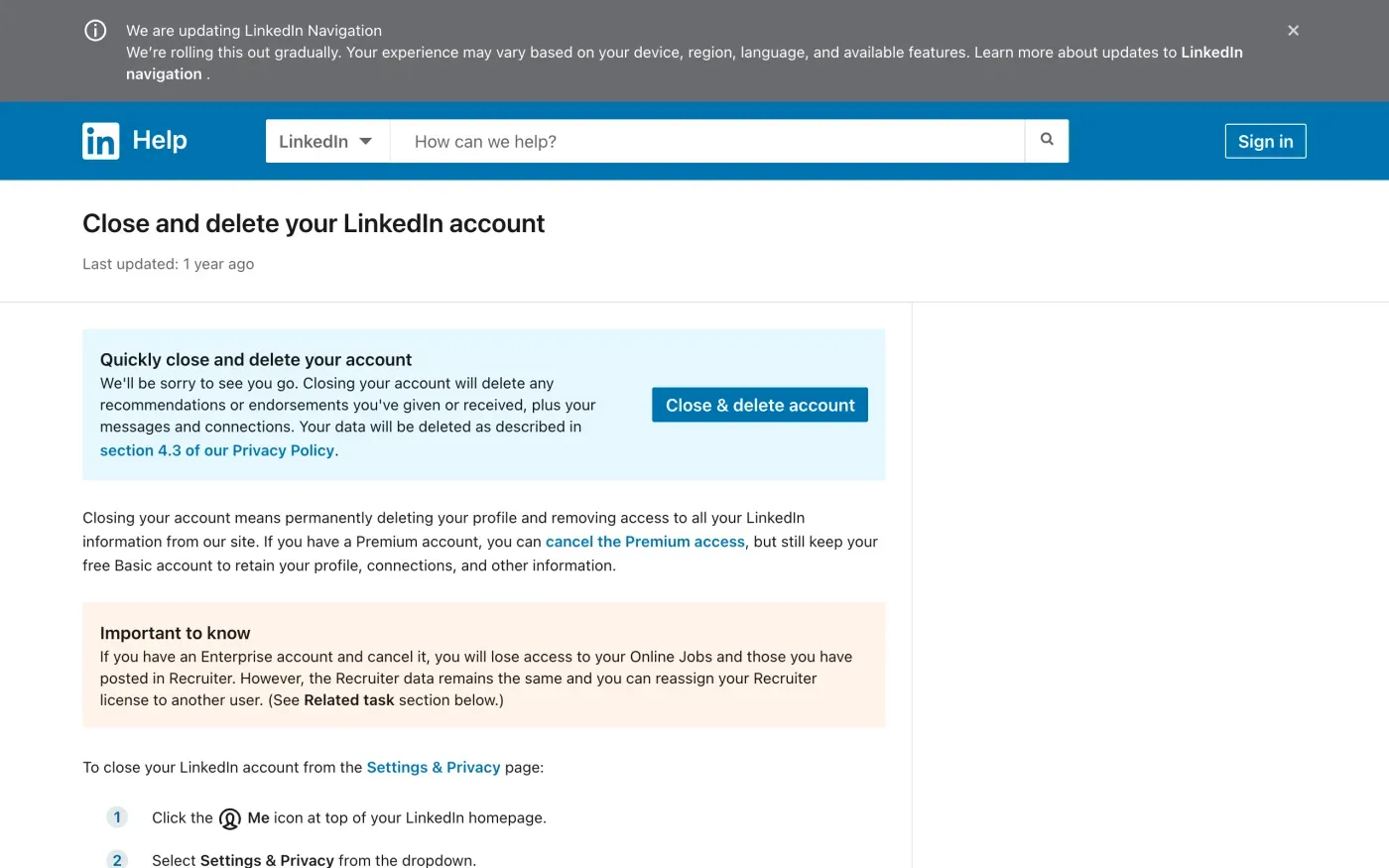
You need your password, so if you are locked out, LinkedIn’s page points you to its help on getting access back to your email or resetting your password. If you used Google, Apple or Microsoft to sign up, the page tells you to unlink that account on the provider’s side as well.
What blocks you, and what you lose
| Situation | What LinkedIn says |
|---|---|
| Premium membership, a group you own, or a premium account license | "you'll have to resolve those accounts before being able to close your Basic account." You can cancel Premium and keep a free Basic account. |
| Enterprise account | "you will lose access to your Online Jobs and those you have posted in Recruiter." The Recruiter data stays and the license can go to another user. |
| Purchases | "Your purchase history will no longer be accessible." Download your receipts first. |
| More than one account | Delete or merge the duplicate. LinkedIn has a separate help page for it. |
| Changed your mind | "You can reopen your account in most cases if it's been closed less than 14 days." Endorsements, recommendations, ignored or pending invitations, followings and group memberships are not recovered. |
What LinkedIn keeps after you close it
Section 4.3 of the privacy policy, Account Closure, says your personal data “will generally stop being visible to others on our Services within 24 hours” and that LinkedIn “generally delete[s] closed account information within 30 days of account closure, except as noted below.” The exceptions are data it keeps “if reasonably necessary to comply with our legal obligations (including law enforcement requests), meet regulatory requirements, resolve disputes, maintain security, prevent fraud and abuse”.
Some of what you shared stays visible to other people:
| What you shared | What the policy says happens |
|---|---|
| InMail, updates, group posts | "will remain visible after you close your account" |
| Groups content, ratings, reviews | Shown with "an unknown user as the source" |
| Data other members copied out | "we do not control data that other Members have copied out of our Services" |
| Your profile in search engines | May appear until the search engines "refresh their cache" |
LinkedIn also says it keeps “de-personalized information” after closure. If you think it kept more than it should, ask in the letter for its reason for each item.
When closing the account is not enough
Closing deletes your profile, but you may want to delete only part of your data, or to ask for something the settings do not reach. The European Regional Privacy Notice sets out three tiers:
Most of your profile data can be deleted through your account settings. You can learn more about deleting your data here. For any data that cannot be deleted in your settings, you can submit a Data Deletion request form. If you would like to delete all your personal data from LinkedIn, you can always choose to close your account.
LinkedIn’s help page on deleting your data lists what you can remove yourself, such as messages, search history and a saved resume, and then says: “If you’d like to request assistance to delete your data or delete data that isn’t listed above, please complete the LinkedIn Data Deletion Form.”
Where to send a request to LinkedIn
LinkedIn publishes forms and postal addresses, and no email address. These are the routes in its European Regional Privacy Notice and its help centre, checked on 15 November 2026:
| Route | Where |
|---|---|
| Data Deletion request form | linkedin.com/help/linkedin/ask/TS-DDF |
| General privacy form (access, restriction, withdrawing consent) | linkedin.com/help/linkedin/ask/ppq |
| Data Protection Officer form | linkedin.com/help/linkedin/ask/TSO-DPO |
| Post, EU, EEA and Switzerland | ℅ Data Protection Officer, LinkedIn Ireland Unlimited Company, Wilton Plaza, Dublin 2, Ireland |
| Post, UK | ℅ Data Protection Officer, 1000 W Maude Avenue, Sunnyvale, CA |
The notice says “LinkedIn online support can be contacted using this form, or live chat for Members.” The help page on its mailing address adds the full wording for the legal department: for the Designated Countries, “LinkedIn Ireland Unlimited Company, Attn: Legal Dept. (Privacy Policy and User Agreement), Wilton Plaza, Wilton Place, Dublin 2, Ireland”, and for everyone else, “LinkedIn Corporation, Attn: Legal Dept. (Privacy Policy and User Agreement), 1000 W. Maude Avenue, Sunnyvale, CA 94085, USA”. LinkedIn defines “Designated Countries” as “countries in the European Union (EU), European Economic Area (EEA), and Switzerland”, which leaves the UK out, even though the Regional Notice covers it.
If you do not want to send the letter below by post, paste its text into the form’s message box. The forms take your request in writing, so keep a copy of what you sent and a screenshot of the confirmation.
Who holds your data, and the UK
LinkedIn runs two controllers. The privacy policy says: “If you are in the “Designated Countries”, LinkedIn Ireland Unlimited Company (“LinkedIn Ireland”) will be the controller of your personal data”. The European Regional Privacy Notice adds the UK: “If you are located in the United Kingdom, LinkedIn Corporation with its address at 1000 W Maude Avenue, Sunnyvale, CA, is the data controller of your personal data.”
For UK members the controller is the US company, not an Irish or British one, so a UK request goes to LinkedIn Corporation and the UK GDPR applies. In the UK, use the UK versions of the letters below. For other countries, the EU versions go to LinkedIn Ireland.
The privacy policy also lists LinkedIn’s group, including Microsoft and its subsidiaries such as GitHub, as “Affiliates”. Accounts on those services are separate and need their own requests. If you are tracing which accounts you have, the guide to finding your accounts helps.
The letter
If you want a copy of everything first, send the access letter, then the erasure letter once you have checked the answer. Fill in the name and email on your LinkedIn account, and your profile URL on a line of its own, so LinkedIn can find you without asking for ID. In the UK use the UK versions.
Access
Dear LinkedIn privacy team,
Under Article 15 of the GDPR, I ask for a copy of all the personal data you hold about me.
Please also tell me why you use it, what kinds of data you hold, who you have shared it with, how long you will keep it, where you got it if not from me, and whether you make automated decisions about me.
My account uses the email address [your account email].
Please answer within one month of receiving this request, as Article 12(3) of the GDPR requires.
Kind regards,
[Your name]
Dear LinkedIn privacy team,
Under Article 15 of the UK GDPR, I ask for a copy of all the personal data you hold about me.
Please also tell me why you use it, what kinds of data you hold, who you have shared it with, how long you will keep it, where you got it if not from me, and whether you make automated decisions about me.
My account uses the email address [your account email].
Please answer within one month of receiving this request, as Articles 12(3) and 12A of the UK GDPR require.
Kind regards,
[Your name]
Erasure
Dear LinkedIn privacy team,
Under Article 17 of the GDPR, I ask you to erase all the personal data you hold about me.
My account uses the email address [your account email]. If you keep any of my data, please tell me what you keep and the legal reason.
Please answer within one month of receiving this request, as Article 12(3) of the GDPR requires.
Kind regards,
[Your name]
Dear LinkedIn privacy team,
Under Article 17 of the UK GDPR, I ask you to erase all the personal data you hold about me.
My account uses the email address [your account email]. If you keep any of my data, please tell me what you keep and the legal reason.
Please answer within one month of receiving this request, as Articles 12(3) and 12A of the UK GDPR require.
Kind regards,
[Your name]
For the deadlines and what LinkedIn must tell you if it refuses, see the deletion letter guide and the UK right to be forgotten guide.
More accounts than LinkedIn?
Reflex finds the companies in your Gmail, sends this letter to each from your own address and follows up for three months. Free to join the beta, €19 once when you start.
If LinkedIn does not answer
LinkedIn has one month from receiving your request, which it can extend by up to two months if it tells you why within the first month (Article 12(3)). See the response deadline guide. If that passes, send a reminder; the guide to ignored requests has one.
The privacy policy says that if contacting LinkedIn does not resolve your complaint, members in the Designated Countries may contact its Data Protection Officer using the form above, and “may have more options under their laws”. The European Regional Privacy Notice says you “always have the right to raise a concern with the supervisory authority in your jurisdiction”. It does not name a lead authority.
LinkedIn Ireland is based in Dublin, so the authority that normally leads on cross-border complaints is Ireland’s Data Protection Commission (Article 56). Its page says you can raise a concern “through our online form”, after you have first contacted the company. You can also complain to the authority where you live (Article 77), and it will pass the complaint on. In the UK, complain to the ICO.
Questions
Does LinkedIn have an email address for privacy requests?
Not one that it publishes in its privacy policy or its European Regional Privacy Notice. They name an online form, a live chat for members, a Data Protection Officer form and two postal addresses. This guide does not guess an email address.
How long does LinkedIn take to delete a closed account?
Its privacy policy says your data generally stops being visible within 24 hours and that it generally deletes closed account information within 30 days, except data it keeps for legal, security or fraud reasons.
Can I get my account back after closing it?
LinkedIn says you can reopen an account in most cases if it has been closed for less than 14 days. It cannot recover endorsements, recommendations, ignored or pending invitations, followings or group memberships.
Why can't I close my LinkedIn account?
LinkedIn's help page says that if you have a premium membership, own a group or have a premium account license, you must resolve those before you can close your Basic account.
Who is in charge of my data on LinkedIn in the UK?
LinkedIn's European Regional Privacy Notice names LinkedIn Ireland Unlimited Company as the controller for the EU, EEA and Switzerland, and LinkedIn Corporation, based in Sunnyvale, California, for the UK.
Sources
- LinkedIn Privacy Policy, Effective 3 November 2025. Sections 4.2 Rights to Access and Control Your Personal Data, 4.3 Account Closure, 5.5 Contact InformationLinkedIn, checked 15 November 2026
- LinkedIn European Regional Privacy Notice, Effective 21 August 2026. Data Controller, Deleting your data, Contact UsLinkedIn, checked 15 November 2026
- Close and delete your LinkedIn accountLinkedIn Help, checked 15 November 2026
- Download your dataLinkedIn Help, checked 15 November 2026
- Delete your dataLinkedIn Help, checked 15 November 2026
- Data RetentionLinkedIn Help, checked 15 November 2026
- User Agreement and Privacy Policy mailing addressLinkedIn Help, checked 15 November 2026
- Data Deletion request formLinkedIn, checked 15 November 2026
- Data Protection Officer contact formLinkedIn, checked 15 November 2026
- Raising a concern with the CommissionData Protection Commission (Ireland), checked 15 November 2026
- Regulation (EU) 2016/679, the GDPR, Articles 12, 15, 17, 56 and 77EUR-Lex, checked 15 November 2026
- Make a complaintICO, checked 15 November 2026