
Zoom has no EU company to write to
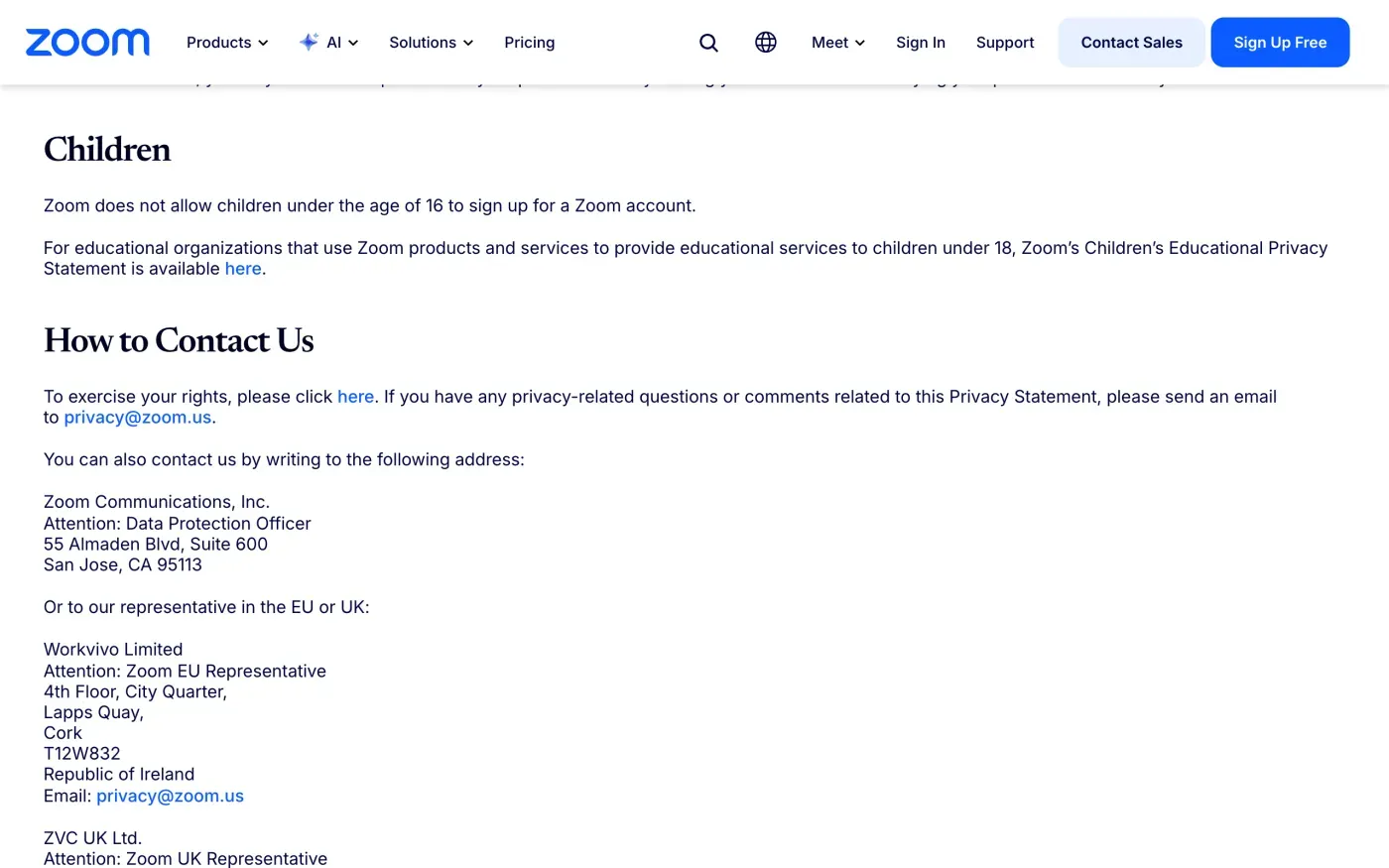
Many large services name an EU company as the controller, but Zoom does not. Its privacy statement, last updated 17 September 2026, says the products it covers are offered “directly by Zoom Communications, Inc.”, and it gives the company’s address in California. For people in the EU and UK it names two representatives instead (the role Article 27 of the GDPR requires of a company outside the EU that serves people in it).
| Who | Role in the statement | Address as printed |
|---|---|---|
| Zoom Communications, Inc. | Controller, Attention: Data Protection Officer | 55 Almaden Blvd, Suite 600, San Jose, CA 95113 |
| Workvivo Limited | Attention: Zoom EU Representative | 4th Floor, City Quarter, Lapps Quay, Cork, T12W832, Republic of Ireland |
| ZVC UK Ltd. | Attention: Zoom UK Representative | Part Level 6, Mid City Place, 71 High Holborn, London, WC1V 6EA, United Kingdom |
The statement gives one email address for all of them: privacy@zoom.us. It also says “You can contact our Data Protection Officer by sending an email to” that same address.
The web form and the email
Zoom’s statement says “In order to exercise any of your rights as to personal data controlled by Zoom, please click here”, and the link opens a privacy rights web form. The short address zoom.us/dsar-form redirects to the same form. The form is a third-party privacy portal. I did not open it or fill it in, so what it asks for is not checked here.
Use the form if you want Zoom’s own route. Send the email in the letter below as well, or instead: it gives you a written record in your own inbox, and the statement lists privacy@zoom.us for privacy questions. Keep a copy of whatever you send.
Why the delete button is not the whole answer
Zoom’s help centre article Deleting your Zoom account says that with a Basic (free) account you “can delete your Zoom account at any time”, and that this permanently deletes it. The steps, from the article:
- Sign in to the Zoom web portal.
The article says to use the web portal, not the app.
- Go to Admin, then Account Management, then Account Profile.
You need the Owner role on the account.
- Select Terminate My Account.
Zoom asks for your password.
- Click Delete.
The deletion is permanent.
Three things fall outside that button.
- A paid account. The article says you must “cancel your subscription and wait until the current billing cycle has ended” before you terminate. The account stays open, and keeps your data, until then.
- An account inside a company or school. If an employer or school manages the account, an admin decides. The article points admins to the separate options to deactivate, unlink or delete users.
- A locked or disabled account. The help centre separates three cases. After five failed sign-ins the account is blocked for 30 minutes. A deactivated account “cannot be reactivated by the user”, only by the owner or admin. A disabled account (error 1003) “cannot be restored through a password reset or by an account admin”. If you cannot sign in, the button is out of reach, and the written request is the route left.
The button removes the account and gives you no copy of your data and no written answer about what Zoom still holds. If you want a copy, ask before you delete.
Getting a copy first
For a copy of your data, use the same web form or email, and ask for access under Article 15 of the GDPR. The subject access request guide has the letter.
Zoom’s help centre also describes a Data & Privacy tool, but it is for account owners. It sits under Security and trust, Data and Privacy, Data subject requests, and lets an owner export or delete data for the users on the account, up to 50 at a time. The article says a link to the exported data is emailed within 30 days. If you are an ordinary user on an employer’s account, you cannot use it, and your employer may also be a controller of the meeting data. Ask them as well.
What Zoom keeps
The privacy statement does not list fixed periods. Its Retention section says: “We retain personal data for as long as required to engage in the uses described in this Privacy Statement, unless a longer retention period is required by applicable law.” It names four things that decide how long:
- how long you have an account or keep using the products
- whether account owners or users delete information through their accounts
- a legal duty to keep the data, for example records of transactions
- whether keeping it is advisable for its legal position, such as disputes or litigation
The letter below asks Zoom to say what it keeps after deletion, the reason, and for how long (Article 12(4) requires the reasons if it refuses).
The statement also covers only products Zoom offers directly. It says it does not cover Zoom products “covered under a separate privacy policy”, which it lists behind a link. If you used one of those, check its own policy for where to send the request.
ID checks
The statement says Zoom “may request you to provide additional information in order to confirm your identity”. Send the request from the email address on your Zoom account and do not attach a passport. A company may ask for more only when it has reasonable doubts about who you are (Article 12(6)). If it asks, offer details it can match against your account, such as the date you signed up or a recent meeting title.
The letter
Fill in your account email and name. Send it to privacy@zoom.us from the address on the account. If you are in the UK, use the version that cites the UK GDPR from the UK right to be forgotten guide.
Dear Zoom privacy team,
Under Article 17 of the GDPR, I ask you to erase all the personal data you hold about me.
My account uses the email address [your account email]. If you keep any of my data, please tell me what you keep and the legal reason.
Please answer within one month of receiving this request, as Article 12(3) of the GDPR requires.
Kind regards,
[Your name]
For the deadlines and what Zoom must tell you if it refuses, see the deletion letter guide.
More services than Zoom?
Reflex finds the companies in your Gmail, sends this letter to each from your own address and follows up for three months. Free to join the beta, €19 once when you start.
If Zoom does not answer
Zoom has one month from receiving your request, extendable by two months only if it tells you why within the first month (Article 12(3)). The guide to ignored requests has a reminder letter and the response deadline guide shows how to count the month.
For a complaint, Zoom gives you no lead authority. Its statement says only “You also have the right to lodge a complaint to a data protection authority” and to contact your local one. Article 77 lets you complain to the authority where you live, so use that one. The EDPB keeps the list of national authorities. In the UK, complain to the ICO. The statement lists ZVC UK Ltd. as Zoom’s UK representative and names Zoom Communications, Inc. as the company behind the products, so the same privacy@zoom.us route applies in the UK.
Questions
What is Zoom's email address for data deletion?
The privacy statement gives privacy@zoom.us for privacy questions, for its data protection officer and for both its EU and UK representatives. It also has a web form for exercising your rights.
Does Zoom have an office in the EU?
The privacy statement names Zoom Communications, Inc. in San Jose, California, and says it has appointed Workvivo Limited in Cork, Ireland as its EU representative. It does not name an EU company as the controller.
Can I delete a paid Zoom account straight away?
No. Zoom's help centre says you must cancel the subscription and wait until the current billing cycle ends before you can terminate the account.
Does deleting my Zoom account delete my data?
Zoom's help centre says terminating the account permanently deletes it. The privacy statement adds that Zoom keeps data as long as the law requires, for example transaction records. Ask for confirmation in writing.
Which data protection authority do I complain to about Zoom?
The privacy statement names none. It says to contact your local data protection authority, so complain to the one in your country, or to the ICO in the UK.
Sources
- Zoom Privacy Statement, Last updated 17 September 2026. Data Rights, How to Contact Us, Retention, European Data Protection Specific InformationZoom, checked 15 November 2026
- Zoom data subject rights request form, Redirects to Zoom's privacy rights web formZoom, checked 15 November 2026
- Deleting your Zoom accountZoom, checked 15 November 2026
- Understanding disabled, deactivated, and locked Zoom accountsZoom, checked 15 November 2026
- Using Data & Privacy for data managementZoom, checked 15 November 2026
- Members of the EDPB, national data protection authoritiesEuropean Data Protection Board, checked 15 November 2026
- Regulation (EU) 2016/679, the GDPR, Articles 3(2), 12, 17, 27 and 77EUR-Lex, checked 15 November 2026
- Make a complaintICO, checked 15 November 2026