
Delete the account, or write to Kahoot!
Kahoot! has two routes, and they do different things.
| Route | What it does | Use it when |
|---|---|---|
| Delete account in Profile settings | Closes your account. The help centre says that once deletion is complete it cannot be restored. | You only want to leave and are happy to trust the button. |
| Email to privacy@kahoot.com | A written request under the GDPR that Kahoot! has to answer, with reasons if it keeps anything. | You want proof, a copy of your data first, or you cannot sign in. |
The privacy notice says: “you can manage your individual account, including requesting account deletion, through your Kahoot! user settings.” Per the help centre the steps are:
- Click your avatar.
It is in the top right of the Kahoot! site while you are signed in.
- Open Profile settings.
Scroll down to Delete account.
- Give a reason and confirm.
Choose a reason, then select Delete your account.
- Change your mind within 5 days.
The help centre says you can recover the account from the login trouble page, on the Cancel deletion tab.
In settings
The delete option sits at the bottom of Profile settings, under your avatar menu.
If your school or employer gave you the account
Kahoot! covers consumer accounts and school accounts in one notice, but it is the controller for only some of them. The notice says that for school services, or services offered through an organisation you belong to, in the UK and EEA, “Kahoot! processes Personal Information as described in this Privacy Notice as a processor under the GDPR / UK GDPR, whilst the school, school district or business entity located in the UK and the EEA is a controller.”
It also says that if you or your child is a student, you should “please contact your school”. So:
- Ask your school or employer to delete the data it holds, and tell them you are using Article 17.
- Send Kahoot! the same request. It can still act on data it controls for its own purposes, and it can tell you whether the school is the controller.
- For a child, a parent can write to privacy@kahoot.com with their name and the child’s Kahoot! username, and say what action they want. Kahoot! says it may need to verify your identity first.
Where to send the request
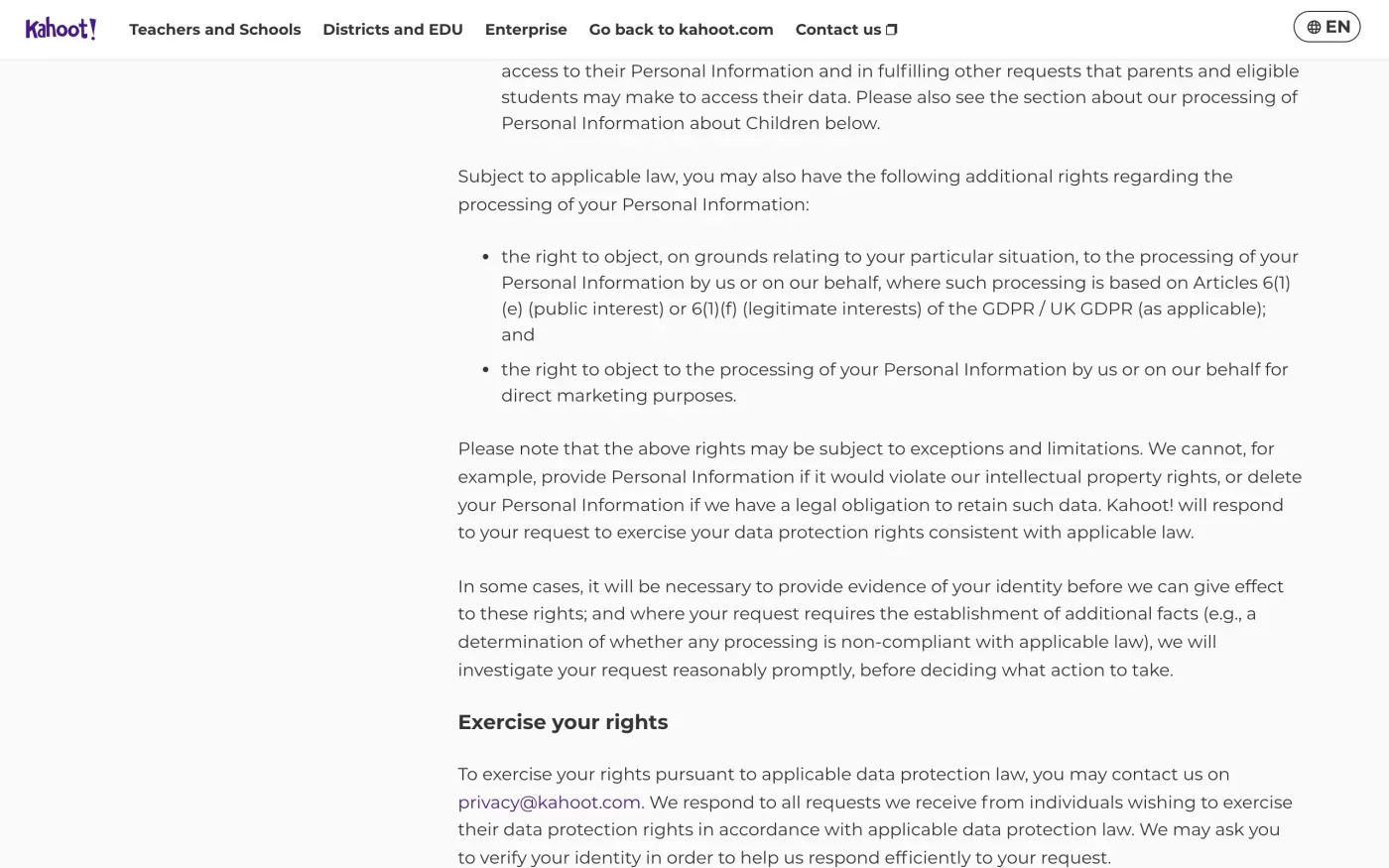
The notice’s Exercise your rights section says: “To exercise your rights pursuant to applicable data protection law, you may contact us on privacy@kahoot.com.” It also lists a Support Contact Form, but the form needs the help centre, which blocked our browser, so email is the route we can quote.
There is no separate address for each product or country. Section 16 names nine controllers and gives one contact for the group:
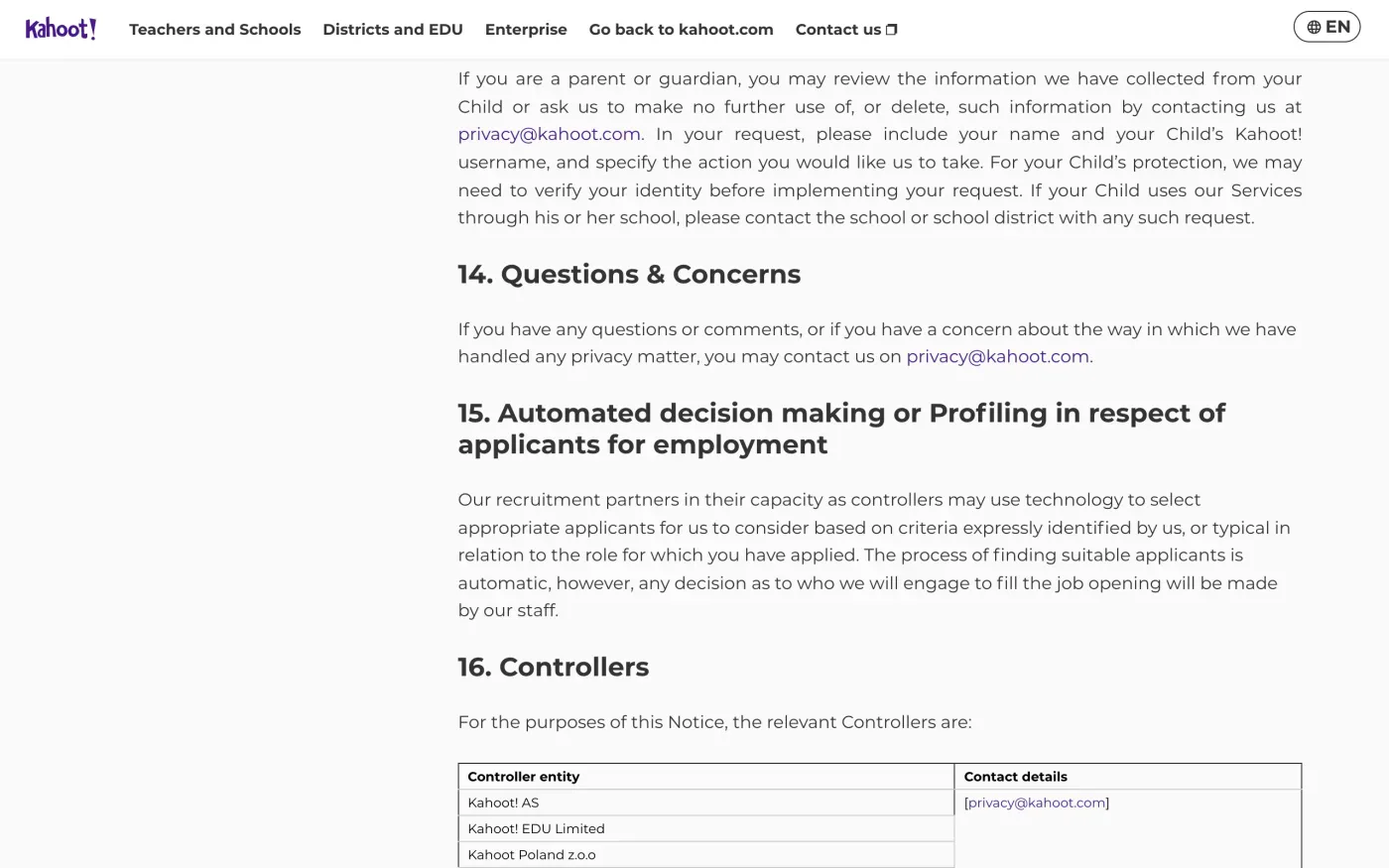
If you also use another Kahoot! group product, such as DragonBox, mention the product and the email you signed up with in your request. Kahoot! AS is at Kronprinsesse Märthas plass 1, 0160 Oslo, Norway, which is the only postal address in the notice. We did not find a data protection officer listed separately in the notice, so write to privacy@kahoot.com.
What Kahoot! keeps
Kahoot! gives no table of periods. Section 9 says it does not keep personal information “longer than necessary”, and keeps it while you have an ongoing relationship with it or while it is needed for lawful purposes, plus the limitation period for legal claims. During those periods it says it restricts use to storage and security. After that it deletes or anonymises the data. The one fixed period is “We generally retain candidate Personal Information for 24 months”, which applies to job applicants.
The letter below asks Kahoot! to say what it keeps, why and for how long (Article 12(4) of the GDPR).
The letter
Copy it into an email to privacy@kahoot.com from the address your Kahoot! account uses. Add your username on a line of its own, and say if the account came from a school.
Dear Kahoot! privacy team,
Under Article 17 of the GDPR, I ask you to erase all the personal data you hold about me.
My account uses the email address [your account email]. If you keep any of my data, please tell me what you keep and the legal reason.
Please answer within one month of receiving this request, as Article 12(3) of the GDPR requires.
Kind regards,
[Your name]
To get your data first, use the access version and send the erasure letter afterwards:
Dear Kahoot! privacy team,
Under Article 15 of the GDPR, I ask for a copy of all the personal data you hold about me.
Please also tell me why you use it, what kinds of data you hold, who you have shared it with, how long you will keep it, where you got it if not from me, and whether you make automated decisions about me.
My account uses the email address [your account email].
Please answer within one month of receiving this request, as Article 12(3) of the GDPR requires.
Kind regards,
[Your name]
Kahoot! EDU Limited is among its listed controllers and the notice covers the UK GDPR, but it names no separate UK address. If you are in the UK, use the UK erasure letter to cite the UK GDPR.
Quiz accounts everywhere?
Reflex finds the companies in your Gmail, sends this letter to each from your own address and follows up for three months. Free to join the beta, €19 once when you start.
If Kahoot! does not answer
Kahoot! has one month to answer, or to tell you within that month why it needs up to two more (deadline guide). Send one reminder, then complain.
Kahoot! AS is in Oslo, so for EU members the lead authority is Norway’s Datatilsynet, which explains how to complain. You can complain to the authority where you live instead (Article 77), and it passes the case on (Article 56). The EDPB keeps the list of authorities. The notice itself points to your local authority. In the UK, complain to the ICO.
Questions
How do I delete my Kahoot! account?
Sign in, click your avatar, choose Profile settings, scroll to Delete account, give a reason and confirm. Kahoot!'s privacy notice also says you can request deletion through your user settings.
Can I undo deleting my Kahoot! account?
For a short time. Kahoot!'s help centre says you can use the Cancel deletion tab on the login trouble page within 5 days of the request. After the deletion is complete it cannot be restored.
What is Kahoot!'s privacy email?
privacy@kahoot.com. Its privacy notice lists that one address for every Kahoot! company that acts as controller, and says it is for exercising your rights.
My school created my Kahoot! account. Who deletes my data?
Your school. For school services Kahoot! says it processes data as a processor and the school or district is the controller. It says to contact your school about access or deletion.
Where do I complain if Kahoot! does not answer?
Kahoot! AS is based in Oslo, so the lead authority is the Norwegian Data Protection Authority, Datatilsynet. You can also complain to the authority where you live, or to the ICO in the UK.
Sources
- Kahoot! Privacy Notice, Effective 22 October 2026. Section 5 Your Data Protection Rights, section 9 Retention, section 16 ControllersKahoot!, checked 16 November 2026
- How to delete my account, Kahoot! help centre. Its server showed a bot check to our browser, so its steps are quoted from the search listingKahoot!, checked 16 November 2026
- How to complain to the Norwegian Data Protection AuthorityDatatilsynet, checked 16 November 2026
- Members of the EDPB, national data protection authoritiesEuropean Data Protection Board, checked 16 November 2026
- Regulation (EU) 2016/679, the GDPR, Articles 12, 15, 17, 56 and 77EUR-Lex, checked 16 November 2026
- Make a complaintICO, checked 16 November 2026