
Account, guest order or locked out
Joom is run by SIA Joom, a Latvian company. Its privacy notice names it as the controller of your data: “SIA Joom, a company incorporated and registered under the laws of the Republic of Latvia with company number 40103993365, legal address: Gustava Zemgala gatve 78-1, Rīga, Latvija, LV1039.”
Which route fits depends on how you used Joom.
| How you used Joom | What Joom says | Best route |
|---|---|---|
| You have an account and the app | The Settings section of the app lets you choose data options, including Delete account and Download my data. | The in-app request, then the letter if you want written proof. |
| You ordered on the website without an account | Purchasing through the website "does not require you to create an account". The privacy notice says your order data is still processed. | Email privacy@joom.com from your checkout address. |
| You cannot log in | You may need to verify your identity before Joom answers, "where you have made an order without creating or using your account or lost your login credentials". | Email privacy@joom.com and say you cannot log in. |
Joom lets you sign in with Google, Facebook, Apple ID or email, depending on your country. If you are not sure which one you used, search your inbox for “Joom” and look at order confirmations, shipping updates or sign-in emails. The address they were sent to is the one Joom holds, and it is the one to write from.
Hiding an order is not deleting it
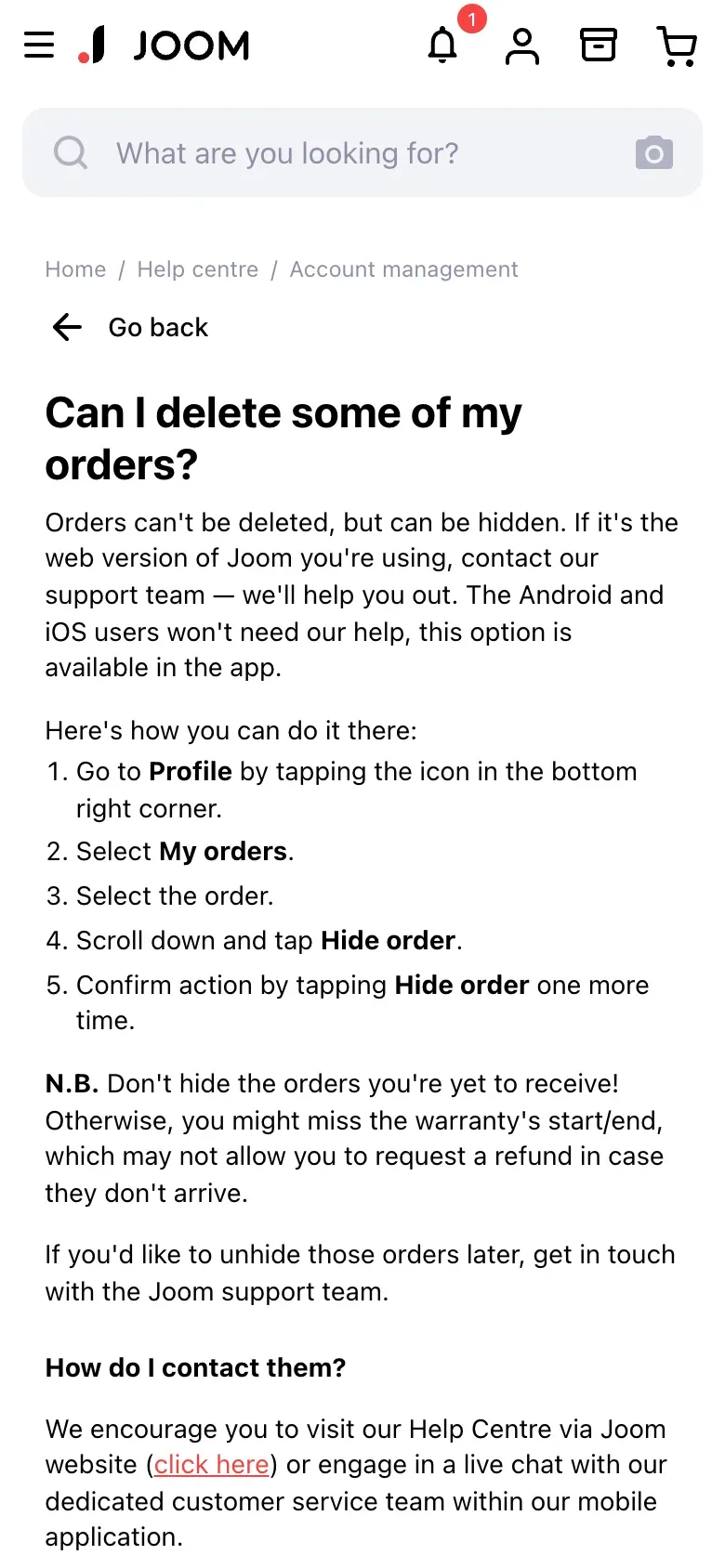
Joom’s help centre says “Orders can’t be deleted, but can be hidden.” In the app, you open Profile, My orders, pick the order, scroll down and tap Hide order twice. On the web version, Joom says to contact support.
Where to send the request
The privacy notice gives these contacts. They are quoted as Joom publishes them.
| For | Joom says |
|---|---|
| Your rights, and anything about your data | privacy@joom.com ("for any inquiries regarding the management of your data or to exercise your rights") |
| The data protection officer | privacy.officer@joom.com |
| Post | SIA "Joom", Gustava Zemgala st. 78-1, LV-1039, Riga, Latvia |
Joom’s privacy notice has one shared address list for every country. I found no separate UK controller named in it, so readers in the UK write to the same Latvian address.
Joom’s help centre also mentions a form in the Personal data section of your profile. Use it if you can log in. If you cannot, email.
What an in-app request does, and what it leaves
The privacy notice lists the options under Manage your personal data: Download my data (“Here you can send a request to get a copy of your data”), Manage data sharing, Delete account (“Here you can send a request to delete your account”), Other, and Cookie settings. Joom says: “Once you submit a request, we will process it and provide you with the relevant reply promptly, within 30 days.” It adds that in some cases it may need more time, and that it will confirm by email.
If you want a copy of everything before you delete, ask for it first. Download my data is the app route. Getting a copy of your data explains what you are entitled to.
| Data | How long Joom says it keeps it |
|---|---|
| Data for running your contract, after a deletion request | Thirty (30) days from your request to delete your account |
| The same data if you simply stop using Joom | In most cases, two (2) years from your last use of the services |
| Data kept for Joom's legitimate interests | In most cases two (2) years from your last use. If it relates to protecting its rights and legal claims, it depends on the limitation period. |
| Data Joom must keep by law | "the period specified by applicable laws and regulations", which "may include compliance with tax, product safety, or other legal requirements" |
| Data kept on your consent | For as long as your consent remains valid. Withdraw it and Joom says it will delete or anonymise the data. |
The notice also says Joom “may still retain the same data for other purposes based on a different legal basis”. In practice, expect order and payment records to stay after your account goes. The letter asks Joom to name the legal reason for anything it keeps (GDPR Article 12(4)).
Joom’s notice warns that deleting your account may leave it “unable to complete your transactions”, so let open orders and refunds finish first.
If you ordered as a guest
Joom’s privacy notice says its processing of order data applies “when you place an order without creating or using your existing account”, without the Basic Account Information. So there is no account to close, but the order data is still held, and your request should name it.
- Email from the address you gave at checkout.
Joom’s help centre says order emails go to the address you entered at checkout, so that is the strongest proof you can offer.
- Quote the order.
Add the order numbers and approximate dates from your confirmation emails. Joom says it may verify your identity before answering a guest request.
- Do not send ID first.
Send an identity document only if Joom asks and explains why (Article 12(6)).
The letter
Fill in the fields and copy it into an email to privacy@joom.com. Use the address you ordered with, and mention any order numbers on a line of their own.
Dear Joom privacy team,
Under Article 17 of the GDPR, I ask you to erase all the personal data you hold about me.
My account uses the email address [your account email]. If you keep any of my data, please tell me what you keep and the legal reason.
Please answer within one month of receiving this request, as Article 12(3) of the GDPR requires.
Kind regards,
[Your name]
For a copy of your data first, or as well, use the access letter.
Dear Joom privacy team,
Under Article 15 of the GDPR, I ask for a copy of all the personal data you hold about me.
Please also tell me why you use it, what kinds of data you hold, who you have shared it with, how long you will keep it, where you got it if not from me, and whether you make automated decisions about me.
My account uses the email address [your account email].
Please answer within one month of receiving this request, as Article 12(3) of the GDPR requires.
Kind regards,
[Your name]
UK readers can use the UK version of the deletion letter, which cites the UK GDPR. Check the deadline guide for how the one month runs.
Ordered from Joom under more than one email?
Reflex finds the companies in your Gmail, sends this letter to each from your own address and follows up for three months. Free to join the beta, €19 once when you start.
If Joom does not answer
Joom says 30 days. The GDPR sets one month, extendable by two more if it tells you why (Article 12(3)). If that passes, send one reminder, then complain. Steps are in what to do if a company ignores your request.
Joom’s privacy notice names the Data State Inspectorate (Datu valsts inspekcija) as its lead supervisory authority. It gives the email pasts@dvi.gov.lv and the postal address Elijas iela 17, Rīga, LV-1050, Latvia, and says a complaint sent by email must carry a secure electronic signature. A complaint sent by post must be signed by hand. The notice points to https://www.dvi.gov.lv/lv/iesniegumu-paraugi for sample documents.
You do not have to complain in Latvia. Article 77 lets you complain to the authority where you live, and the notice says so too. The EDPB keeps the list of national authorities. In the UK, the ICO takes complaints.
Questions
Can I delete my Joom account in the app?
Joom's privacy notice lists a Delete account option under Manage your personal data, where you can send a request to delete your account. It is a request, not an instant button. Joom says it replies within 30 days.
Can I delete my Joom orders?
Not with the help-centre route. Joom says "Orders can't be deleted, but can be hidden." Hiding only removes an order from your view. To have the order data erased, send an erasure request, knowing Joom may keep some of it for tax or customs rules.
I ordered on Joom without an account. Can I still ask for my data to be deleted?
Yes. Joom's privacy notice says it processes your data when you order without an account and that it may verify your identity before answering. Email privacy@joom.com from the address you gave at checkout and quote the order details.
How long does Joom keep my data after I delete my account?
Joom says it keeps data for contract purposes for 30 days from your deletion request, or two years from your last use of the service if the account is simply left. It may keep the same data longer for legal reasons, such as tax and customs law.
Who do I complain to if Joom ignores me?
Joom's lead authority is the Data State Inspectorate in Latvia. You can also complain to the data protection authority where you live.
Sources
- Joom privacy notice, Section 2, Data Controller and Useful Contacts; section 3, Your Rights and How to Manage Your Data; section 6, Data Retention; Manage your personal dataJoom, checked 16 November 2026
- Can I delete some of my orders?Joom help centre, checked 16 November 2026
- Why do I need to sign up?Joom help centre, checked 16 November 2026
- Personal data protectionJoom help centre, checked 16 November 2026
- I can't log inJoom help centre, checked 16 November 2026
- Members of the EDPB, national data protection authoritiesEuropean Data Protection Board, checked 16 November 2026
- Regulation (EU) 2016/679, the GDPR, Articles 12, 15, 17, 56 and 77EUR-Lex, checked 16 November 2026
- Make a complaintICO, checked 16 November 2026