
What happens to your texts depends on the version
Most people use DeepL by pasting in text, and that text can be personal: emails, contracts, a letter from a landlord. What DeepL does with it depends on the version you used.
| What you used | What DeepL says happens to your texts |
|---|---|
| Translator or Write, free version | "We process the content you upload and their translations or improvements for a limited period of time to train and improve our neural networks and algorithms." |
| Translator Pro, API Pro or Write Pro | Texts "will not be permanently stored", and "After complete performance of the contractually agreed services all submitted texts or documents and their translations or improvements will be deleted." |
| Saved translations, glossaries, Translation Memories | Kept in your account until you delete them or the account. DeepL says that deleting a Translation Memory or the account deletes the embeddings built from it too. |
The free version is the one to ask about. DeepL’s policy gives no period for “a limited period of time”. Your letter should ask for it, and ask DeepL to erase what it still holds from your free use. If you never logged in, DeepL may have little it can link to you beyond an IP address, which the policy says it keeps for free users for a maximum of 14 days.
Delete the account yourself
The privacy policy says: “You can delete your DeepL account at any time within the account settings or by sending an e-mail with your request to support(at)deepl.com.”
DeepL’s help centre article Delete your DeepL account gives the steps, as DeepL’s own help-centre search describes them. The help centre blocked our automated screenshot with a security check, so look at the article yourself.
- Cancel any paid subscription first.
The help centre says you cannot delete the account while a subscription is active. The privacy policy says the same in other words: “We will delete your account if you wish to do so after canceling your subscription.”
- Log in and open your account area.
Look for Delete account at the bottom of the page.
- Confirm with Delete account permanently.
The help centre says a deleted account cannot be reactivated, and you lose access to data such as invoices and glossaries. Download what you need first.
- No Delete account button?
The help centre says to contact DeepL Support. You can also email support@deepl.com, the address in the privacy policy.
A DeepL Bridges Platform account is a different account. The policy says: “please reach out to team@deepl-bridges.com. Please also note that the deletion of your Platform account will not impact or delete your separate DeepL account.”
Where to send a data request
The account button deletes the account. For everything else, write to the privacy address. DeepL’s policy says: “If you have any questions or concerns about privacy, please contact privacy(at)deepl.com.” The rights section adds: “If you wish to exercise any of the rights listed below, please contact us at the above address.”
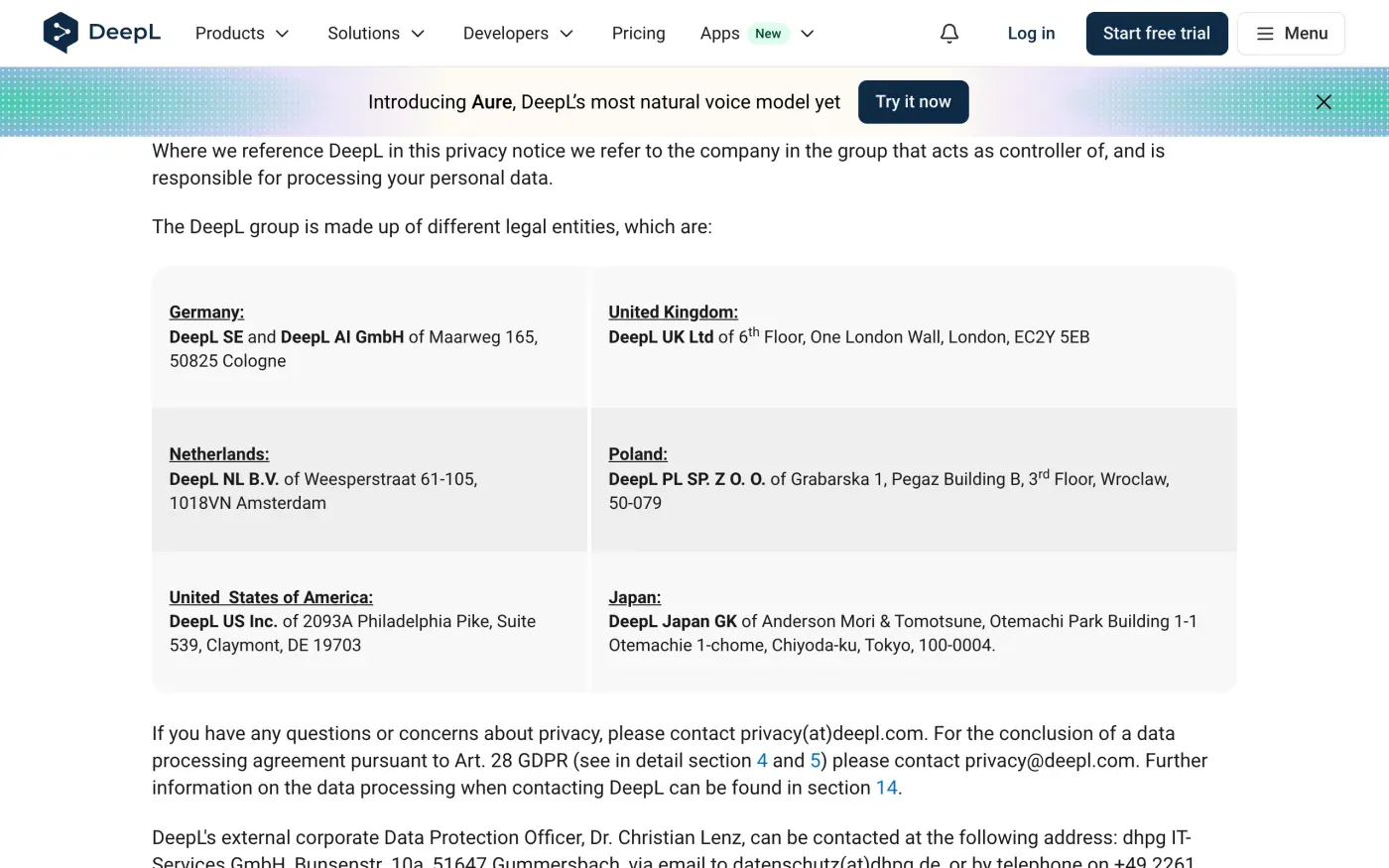
The policy gives no request form. It also does not say whether a request to support@deepl.com or to privacy@deepl.com is handled differently, so send data requests to privacy@deepl.com and keep the account deletion with support.
DeepL SE and DeepL AI GmbH are at Maarweg 165, 50825 Cologne, Germany. The policy also names an external data protection officer, Dr. Christian Lenz, at dhpg IT-Services GmbH, Bunsenstr. 10a, 51647 Gummersbach, by email at datenschutz(at)dhpg.de or by telephone on +49 2261 8195 0.
Ask for a copy first if you want one
The policy lists the right of access: “We will gladly confirm whether we are processing any of your personal data, which data we are processing, and for what purpose we are processing it.” The policy describes no download tool, so ask in writing. Copy your glossaries and saved translations yourself before you delete the account, since the help centre says they are gone afterwards. The subject access request guide covers what you are entitled to receive.
What DeepL keeps
The privacy policy gives these periods and conditions:
| Data | What the policy says |
|---|---|
| Account and payment data | Kept for the contract term, and then "for the duration of statutory retention periods, insofar as these prescribe the retention for the respective types of data". |
| IP address, free users | Full address stored for "a maximum period of 14 days". |
| IP address, Pro users | Stored for the duration of the contract. |
| Translation process logs | Stored in a database that selected employees can access and "automatically deleted after 14 days". |
| Recorded calls with DeepL | Stored for "a period of two years from the date of the call". |
DeepL says it will comply with an erasure request “as far as legally possible”. That matches Article 17(3) of the GDPR, which lets a company keep data it must keep by law. Ask DeepL to name the law for anything it keeps.
Proving it is your account
The policy does not say what DeepL asks for. Send the request from the email address on your DeepL account, and give no passport or card details. Under Article 12(6) DeepL may ask for more only if it has reasonable doubts about who you are.
The letter
Send it to privacy@deepl.com from your account email. Add that you used the free version, if you did, and ask for the period DeepL kept your texts and whether they were used to train its models. If you want a copy, ask for it before you delete the account.
Dear DeepL privacy team,
Under Article 17 of the GDPR, I ask you to erase all the personal data you hold about me.
My account uses the email address [your account email]. If you keep any of my data, please tell me what you keep and the legal reason.
Please answer within one month of receiving this request, as Article 12(3) of the GDPR requires.
Kind regards,
[Your name]
In the UK, use the UK version of the letter, which cites the UK GDPR. The deletion letter guide explains the deadlines and what DeepL must tell you if it refuses.
More than one tool holds your texts?
Reflex finds the companies in your Gmail, sends this letter to each from your own address and follows up for three months. Free to join the beta, €19 once when you start.
If you use other writing tools, the guides for Grammarly and ChatGPT cover them.
If DeepL does not answer
DeepL has one month to answer, extendable by two months only if it tells you why in the first month (Article 12(3)). If it misses that, send a reminder from the guide to ignored requests, then complain.
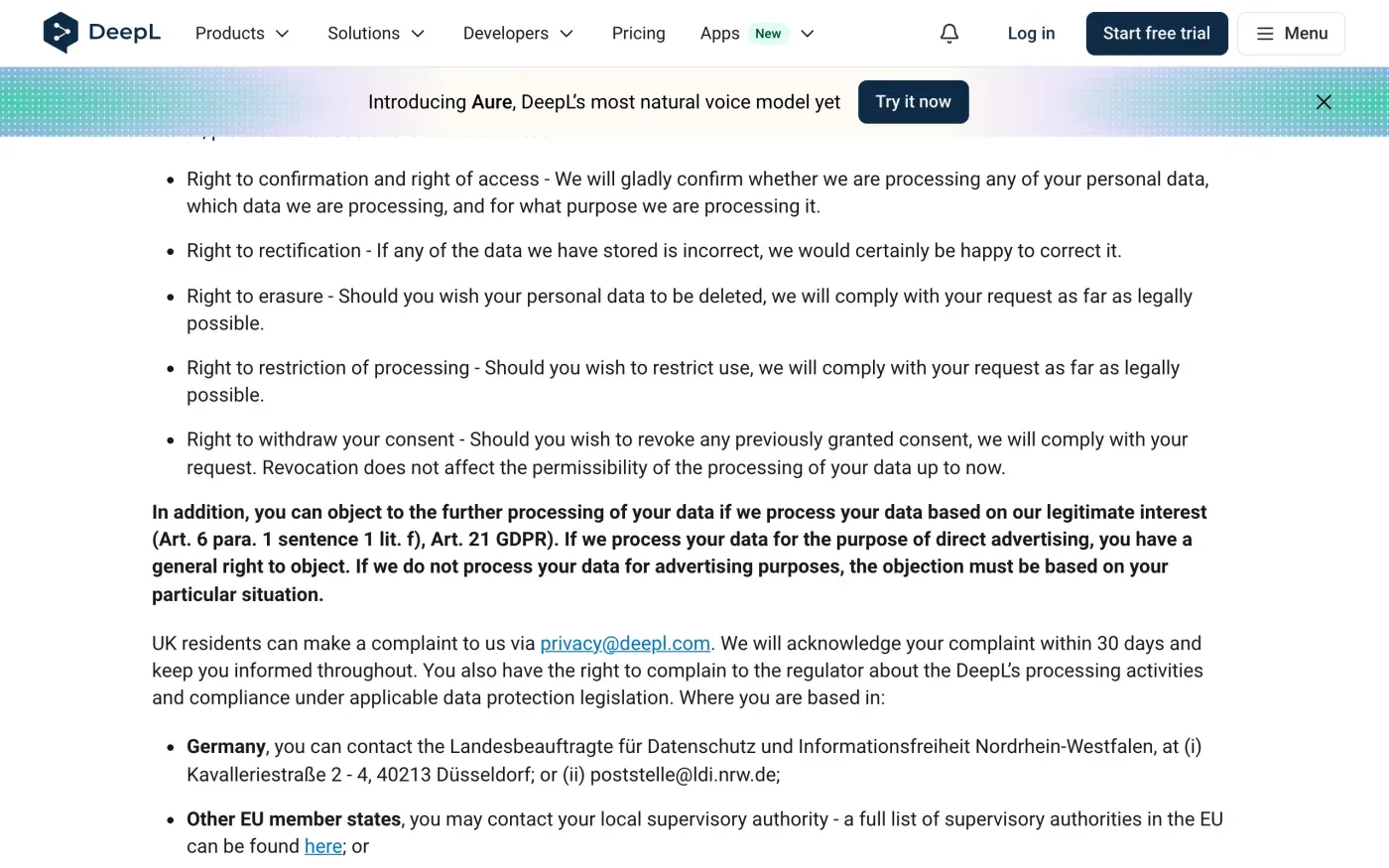
The policy says: “Germany, you can contact the Landesbeauftragte für Datenschutz und Informationsfreiheit Nordrhein-Westfalen, at (i) Kavalleriestraße 2 - 4, 40213 Düsseldorf; or (ii) poststelle@ldi.nrw.de”. For other EU countries it says to contact your local supervisory authority, and the EDPB keeps the list of national authorities. Article 77 lets you complain where you live.
In the UK, the policy says UK residents can complain to DeepL at privacy@deepl.com, which it will acknowledge within 30 days, and can complain to the ICO.
Questions
How do I delete my DeepL account?
DeepL's privacy policy says you can delete your account at any time within the account settings, or by emailing support@deepl.com. Its help centre says you have to cancel any active subscription first.
Does DeepL keep the texts I translate?
On the free version, DeepL says it processes your texts for a limited period to train and improve its neural networks. On Pro, it says texts are not permanently stored and are deleted after the service is performed, except content you save yourself, such as glossaries.
What is DeepL's email address for data requests?
Its privacy policy says to contact privacy@deepl.com with privacy questions and to use the contact address to exercise your rights. Account deletion by email goes to support@deepl.com.
Who regulates DeepL?
The policy names the North Rhine-Westphalia data protection authority for readers in Germany, and your local authority for other EU countries. UK readers can complain to the ICO.
Does DeepL have a UK company?
Yes. The privacy policy lists DeepL UK Ltd at 6th Floor, One London Wall, London, EC2Y 5EB. It does not say which DeepL company is the controller for UK users.
Sources
- DeepL privacy policy, Last update October 2026. Sections 1, 3, 5, 6, 8, 23DeepL, checked 16 November 2026
- Delete your DeepL account, Help centre articleDeepL, checked 16 November 2026
- About the deletion of customer content, Help centre article, listed in DeepL's help centre searchDeepL, checked 16 November 2026
- Regulation (EU) 2016/679, the GDPR, Articles 12, 15, 17 and 77EUR-Lex, checked 16 November 2026
- Members of the EDPB, national data protection authoritiesEuropean Data Protection Board, checked 16 November 2026
- Make a complaintICO, checked 16 November 2026